Craft Joyful Memories: Free Thanksgiving Cut Files for Custom Family Shirts with Your Silhouette Machine!
Thanksgiving is a time for gratitude, family, delicious food, and creating cherished memories. While celebrations might look a little different this year, the spirit of thankfulness remains vibrant. What better way to embrace the festive atmosphere and add a personal touch to your holiday gathering than with custom-made Thanksgiving shirts for the entire family? Imagine the smiles, the laughter, and the adorable family photos featuring unique, handcrafted apparel that truly captures the essence of the season. Thanks to the incredible versatility of your Silhouette Cameo or Portrait machine and a little bit of creativity, whipping up these personalized garments is not only easy but also incredibly fun!
This year, I was determined to make the most of one of my absolute favorite holidays. I decided to go “a little extra” and design some truly special DIY shirts for my family. With the precision and efficiency of my trusty Silhouette machine, it was a breeze to transform simple fabric into festive statements. And the best part? I’m sharing all the designs with you so you can easily replicate these joyous creations at home!
This post is brought to you in partnership with Silhouette America. All opinions are my own.
Discover the Magic of Heat Transfer Vinyl (HTV) for Personalized Apparel
If you’re new to the world of custom apparel, let me introduce you to the fantastic material known as heat transfer vinyl (HTV), often simply called iron-on vinyl. This special material is designed to be cut with electronic cutting machines like the Silhouette Portrait or Cameo. Once cut, the vinyl design is then applied to fabric using heat – either from a household iron or a heat press. The result? Custom, one-of-a-kind shirts (or any fabric item!) with a professional, permanent design that can withstand repeated washing in a machine.
HTV comes in an amazing array of colors, finishes, and textures, allowing for endless creative possibilities. You can find smooth matte vinyl, vibrant glossy options, shimmering glitter vinyl, soft flocked vinyl, metallic foils, stretchy athletic vinyl, and even specialty patterns. Each type brings a unique look and feel to your projects, enabling you to perfectly match the aesthetic you envision for your Thanksgiving attire.
Beyond T-Shirts: Unleash Your Creativity with HTV
While custom t-shirts are a popular choice, the potential of heat transfer vinyl extends far beyond just apparel! Don’t limit your imagination; HTV can transform a vast range of fabric items into personalized masterpieces. Consider these ideas for your Thanksgiving crafting:
- Tote Bags: Create custom reusable bags for groceries or carrying holiday goodies.
- Baby Bibs & Onesies: Adorable personalized items for the littlest family members, perfect for capturing messy, cute mealtime moments.
- Socks & Sneakers: Add a quirky touch to everyday wear with small designs.
- Canvas Items: Embellish canvas sneakers, pouches, or decorative wall hangings.
- Hair Scrunchies & Headbands: Fun accessories for all ages.
- Sweatpants & Sweatshirts: Cozy and comfortable matching sets for lounging or post-dinner walks.
- Aprons: Perfect for the family chef or little helpers in the kitchen.
- Kitchen Towels & Pot Holders: Add a festive touch to your kitchen decor.
- Throw Pillows: Customize seasonal decor for your living space.
- Table Runners & Placemats: Elevate your Thanksgiving table setting with unique designs.
- Pet Bandanas: Don’t forget your furry family members!
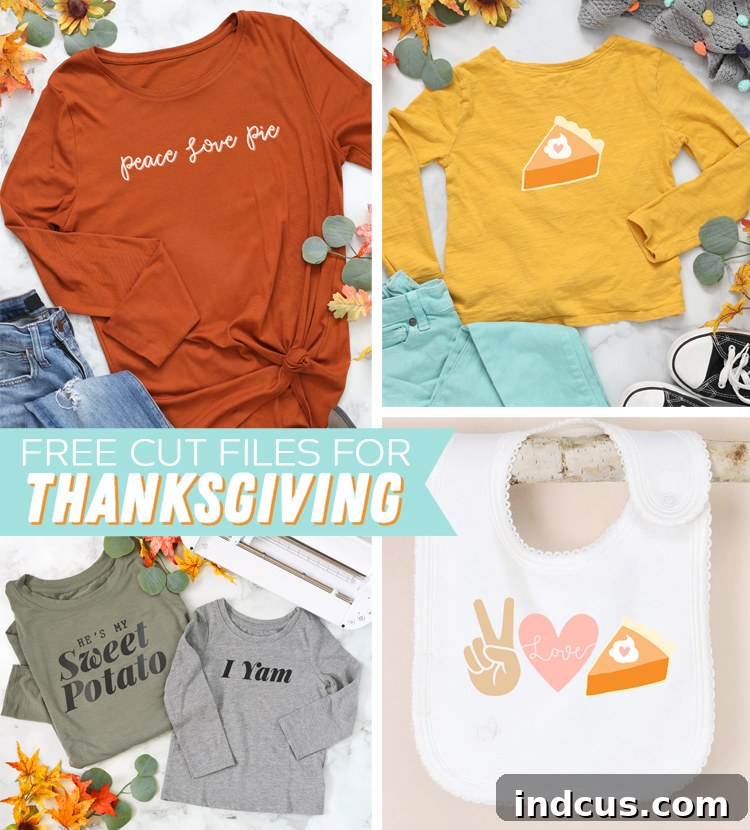
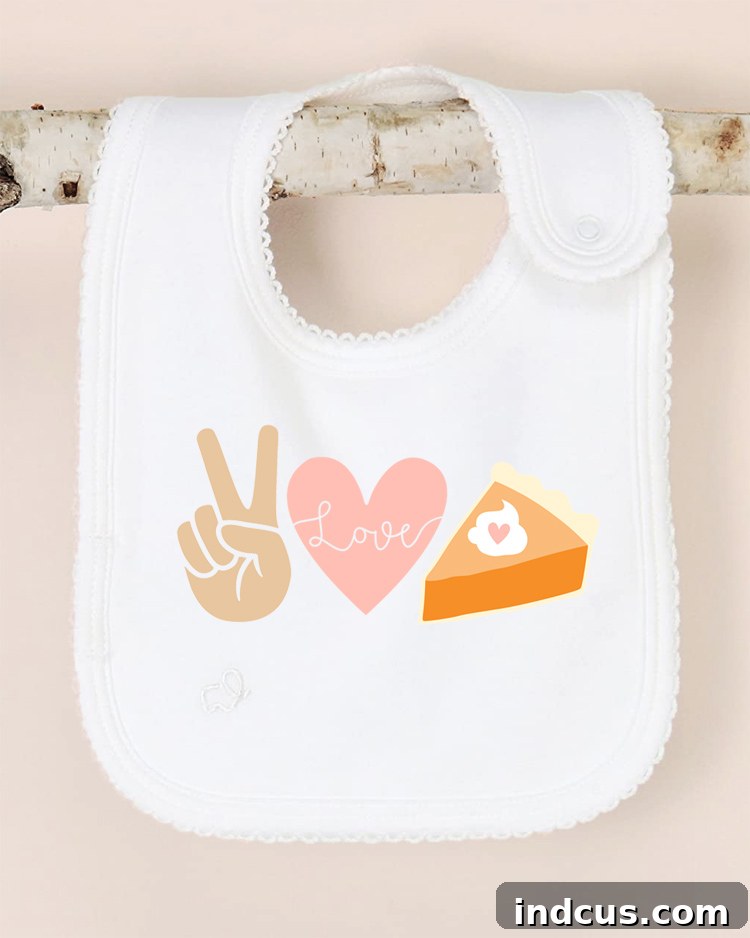
For my baby niece this Thanksgiving, I couldn’t resist making a special baby bib. The design features a heartwarming message:
Peace. Love. Pie.
Mastering Layered Heat Transfer Vinyl for Stunning Designs
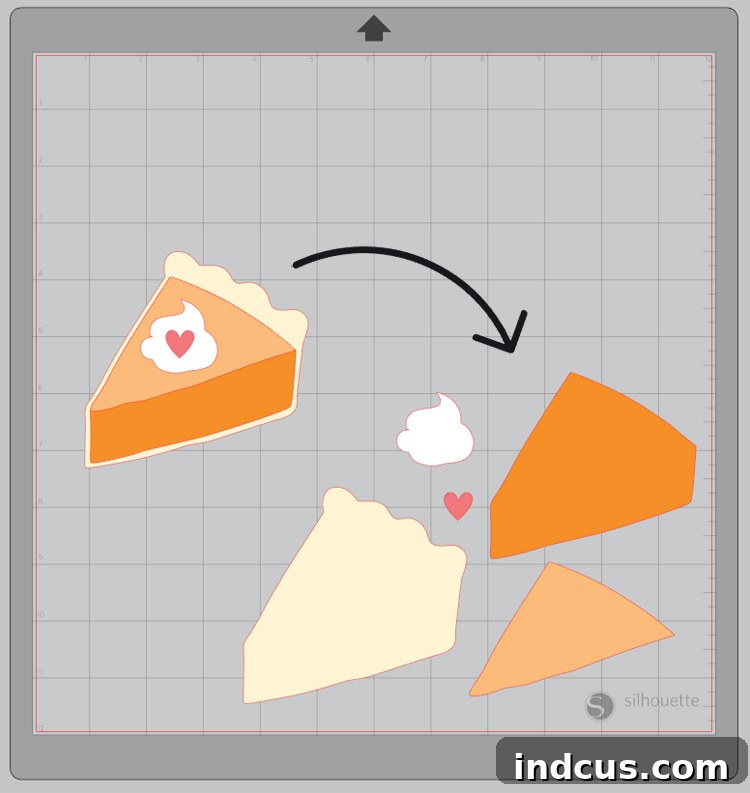
The “Peace. Love. Pie.” design is a wonderful example of how you can use different colors of vinyl layered together to create a multi-colored, visually rich image. Layering HTV adds depth and dimension to your projects, making them truly stand out. While it might seem intimidating at first, it’s a straightforward process once you understand a few key steps.
When you open the cut file for this layered design in Silhouette Studio, you’ll notice that all the individual layers are grouped together. To prepare them for cutting, you’ll need to separate them. Simply right-click on the image, then select “UNGROUP.” This action will allow you to grab and manipulate each individual piece of the design independently. You’ll need to cut each layer separately, as each one will come from a different color of heat transfer vinyl. This methodical approach ensures precision and vibrant results.
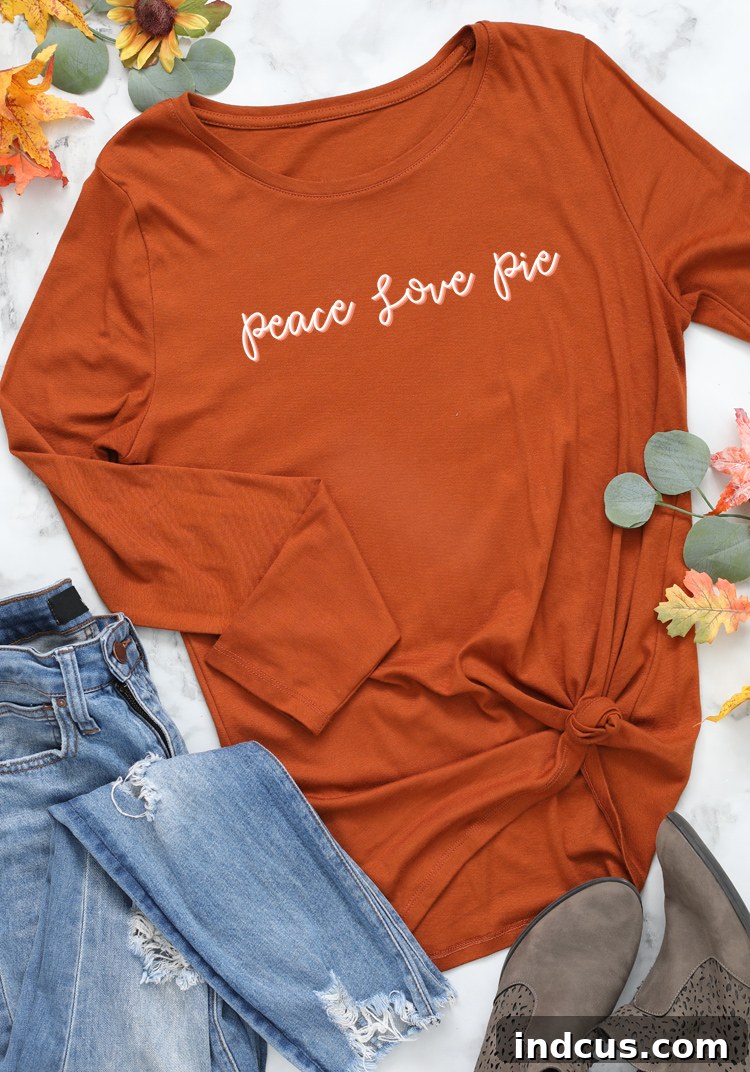
The layered look is incredibly popular and adds a sophisticated touch to any garment. For instance, my teenage daughter’s shirt features a simple, understated design, yet it also incorporates layered iron-on vinyl. Can you discern that subtle shadow effect underneath the main white vinyl? This clever layering technique instantly adds depth and a professional finish. If you haven’t experimented with layering HTV yet, I highly recommend giving it a try! It opens up a whole new world of design possibilities.
A crucial tip for layering: Always be sure to read the manufacturer’s label for the specific type of vinyl you are using. Some specialty heat transfer materials, such as glitter vinyl, flocked vinyl, holographic, or metallic vinyl, are generally only recommended for use as the top layer in a layered design. This is because their unique textures or chemical compositions can prevent other vinyl types from adhering properly to them. Sticking to smooth HTV for bottom layers and reserving specialty vinyl for the very top layer will help you achieve the best, most durable results.
Our Favorite Designs: “Mommy and Me” Thanksgiving Shirts
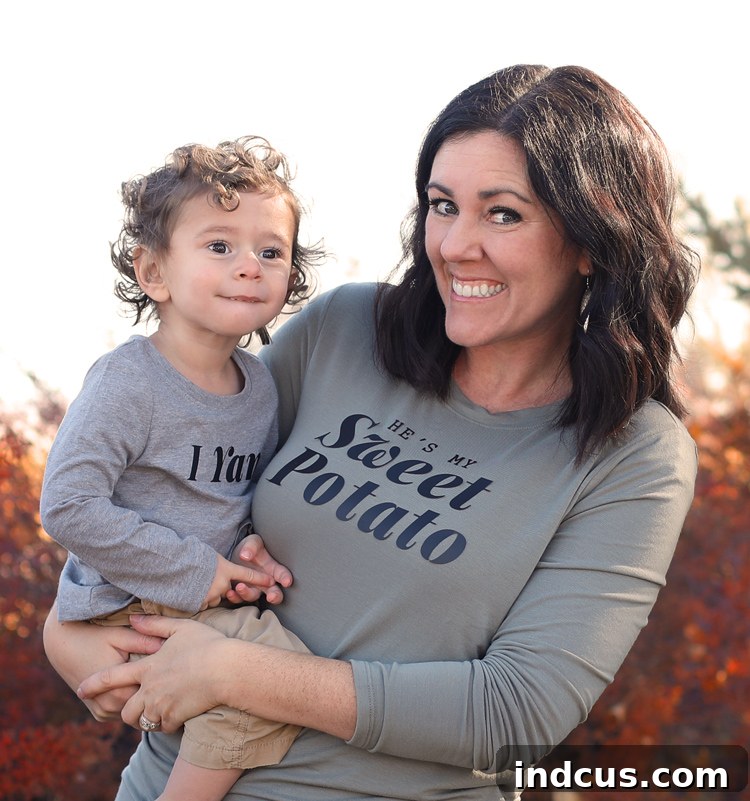
I definitely saved my favorite design for last – our adorable “Mommy and Me” Thanksgiving shirts! These are perfect for creating those heartwarming, giggle-inducing photos that you’ll treasure for years to come. The play on words is just too good to resist:
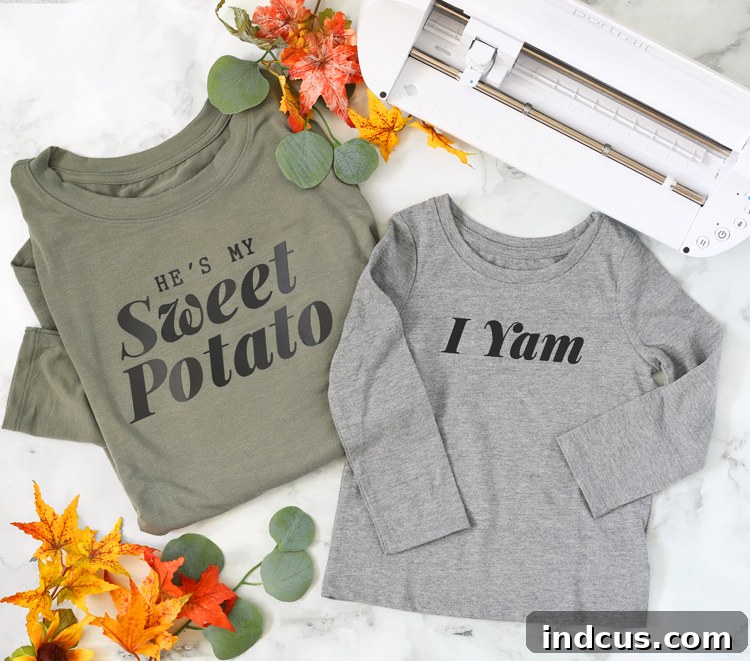
Get it? I am. I yam.
LOL. I crack myself up! As a parent, you know these precious years fly by quickly. My little one won’t be little for much longer, so I’m embracing all the cheesy, fun, and memorable things we can do together now. Soon enough, he’ll be a shy teenager, but we’ll always have these special moments and the custom shirts that marked them.
Your Free Thanksgiving T-Shirt Cut Files Await!
I’m thrilled to offer all of these fun Thanksgiving designs to you for free! Everything is conveniently packaged in one downloadable folder, making it easy to access and start your crafting journey. You’ll find both SVG files and PNG files for each design, ensuring compatibility with various crafting software and machines (though optimized for Silhouette). Plus, as a bonus, I’ve included an extra “SHE’S my sweet potato” file, perfect for another fun play on words or a complementary design for a sister or friend.
The SVG format (Scalable Vector Graphics) is ideal for cutting machines as it allows you to resize designs without losing quality. PNG files (Portable Network Graphics) are great for printing or for use as a trace file if you prefer to design directly within Silhouette Studio. Whichever format you choose, these files are ready to help you create stunning personalized Thanksgiving apparel.
Looking for even more Thanksgiving design inspiration? Be sure to explore the Silhouette Design Store! They feature an incredible array of cut files created by talented designers. With thousands of options, you’re sure to find tons of cute, clever, and festive designs to tempt you and spark even more creative projects for the holiday season and beyond.
Step-by-Step: How to Make a Custom Shirt with Heat Transfer (Iron-On) Vinyl
For those who are new to HTV or just need a quick refresher, the process is quite simple and rewarding. If you prefer a visual guide, the one-minute video below will walk you through the essential steps. Otherwise, follow the detailed written instructions provided here to master your custom shirt creation:
Detailed Instructions for Applying Iron-On Vinyl:
- Download and Open Your Cut File: Begin by downloading the free Thanksgiving cut file folder. Extract the files and then open your chosen design in Silhouette Studio. If you’re using an SVG, import it directly. If you’re using a PNG, you may need to use the trace function to create cut lines.
- Measure, Resize, and Position Your Design: Before cutting, measure the shirt or item you plan to customize. Consider where you want the graphic to sit and how large it should be. In Silhouette Studio, click on your image, hover over one of the white squares in the corners, click, and drag to resize. For adult-sized shirts, a graphic around 8-10 inches across is common, while toddler shirts might be closer to 5-6 inches. Ensure your design fits well and is aesthetically pleasing.
- Crucial Step: Mirror Your Image! For heat transfer vinyl, you *must* mirror your design horizontally. This is because you cut HTV from the back (dull) side, and when you flip it over to iron onto your fabric, it will appear correctly. To do this, click OBJECT > MIRROR > MIRROR HORIZONTALLY in Silhouette Studio. If you skip this step, your text and directional images will be backward!
- Adjust Cut Settings for HTV: Navigate to the SEND tab in the upper right-hand corner of Silhouette Studio. Here, you’ll select your material type (e.g., “Heat Transfer Vinyl, Smooth” or “Heat Transfer Vinyl, Glitter”). The software will suggest blade depth, force, and speed settings. It’s always a good idea to do a small test cut (a “test rectangle” is built into the software) with your specific vinyl to ensure the settings are perfect before cutting your full design.
- Load Vinyl and Cut: Place your heat transfer vinyl onto your cutting mat with the shiny (carrier sheet) side down and the dull (vinyl) side up. Load the mat into your Silhouette machine. Once ready, hit the blue SEND button to begin cutting your design. The Silhouette’s precision will amaze you!
- Weed Away Excess Vinyl: After your design is cut, unload the mat from the machine. Now comes the “weeding” process. This involves carefully removing all the excess vinyl that is not part of your design. Use a weeding tool (a hook or pointy tweezers work great) to peel away the surrounding vinyl, as well as any inner pieces like the centers of “o”s or “a”s. Take your time to ensure all unwanted pieces are removed, leaving only your desired graphic on the clear carrier sheet.
- Center Design and Apply Heat: Preheat your iron to the cotton setting (no steam) or your heat press to the recommended temperature for your vinyl (usually 305-320°F). Place your weeded design onto your shirt or fabric item, with the clear carrier sheet facing up. Ensure it’s perfectly centered and aligned. Cover the design with a clean white cloth or a Teflon sheet to protect the vinyl and your fabric. Press down firmly with your iron, applying even pressure for about 20-30 seconds, or according to your vinyl’s instructions. If using a heat press, close the press for the recommended time.
- Peel and Finish! Once the pressing time is complete, carefully peel away the clear carrier sheet. Some vinyl types are “hot peel” (peel immediately), while others are “cold peel” (let cool completely before peeling). Check your vinyl’s instructions. If any part of the design lifts, lay the carrier sheet back down, cover with your cloth, and repress for a few more seconds. Once the carrier sheet is removed and the design is fully adhered, your custom shirt is done!
Caring for Your HTV Garments:
To ensure your beautiful custom shirts last as long as possible, follow these care instructions: Wait 24 hours before washing. When washing, turn the garment inside out. Use cold water and a gentle cycle. Tumble dry on low or, ideally, hang to dry. Avoid bleach, harsh detergents, and direct ironing on the vinyl design.
I hope these free cut files and detailed instructions empower you to create some truly special Thanksgiving apparel this year. Happy crafting, and have a wonderful, joy-filled Thanksgiving!