Crafting Smiles: How to Add a Funny Mouth Graphic to Your DIY Fabric Face Mask with Silhouette Cameo and Printable Heat Transfer Material

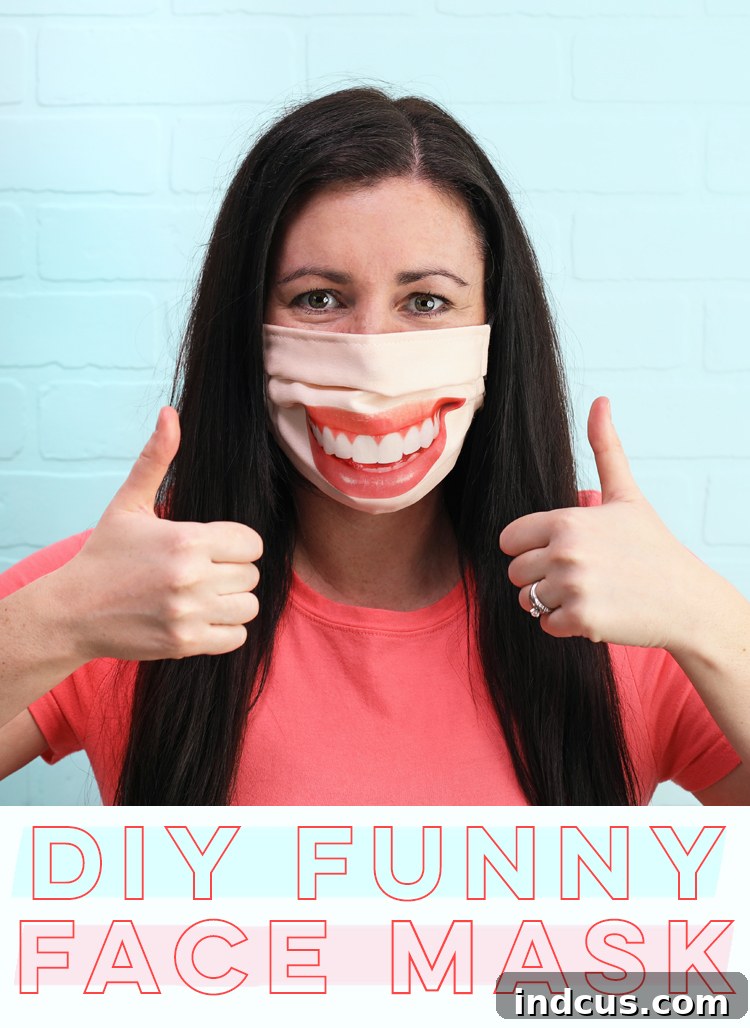
In challenging times, a little bit of laughter can go a long way. As face masks become an essential part of our daily lives, why not transform a functional item into a source of joy and amusement? This comprehensive guide will walk you through the exciting process of adding a unique, realistic, or even hilariously silly photo mouth graphic to your DIY fabric face mask. Imagine the smiles and double-takes you’ll inspire as you navigate your day!
Personalizing your fabric face mask isn’t just about making a statement; it’s about injecting some much-needed lightness into our routines. Forget plain, boring masks – let’s embrace creativity and spread positivity one smile (or silly mouth) at a time. If you’re new to the world of fabric mask creation, don’t worry! We recommend checking out our Ultimate Guide to Making Fabric Face Masks for a solid foundation before diving into this fun customization project.
Using a Silhouette Cameo machine and printable heat transfer vinyl (HTV), this project is surprisingly straightforward and yields professional-looking results. Whether you want to replicate your own smile, a cartoon grin, or a quirky animal mouth, the possibilities are endless. Get ready to turn heads and brighten spirits with your uniquely designed, custom fabric face mask!
This innovative project is brought to you with the generous support of Silhouette America, a leader in personal crafting technology. While their cutting-edge tools make this idea possible, the quirky concept of a funny mouth mask is entirely our own creative spark!
Essential Supplies for Your Custom Face Mask Project
To embark on this delightful DIY journey and add a fun mouth graphic to your fabric face mask, you will need a few key materials and tools. Gathering everything beforehand ensures a smooth and enjoyable crafting experience.
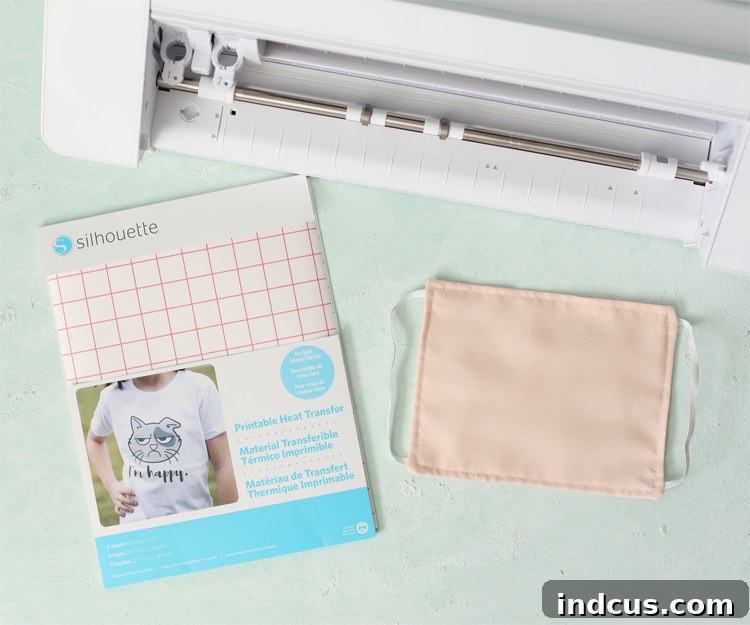
Materials and Tools Needed:
- Silhouette Cameo Machine: Your versatile cutting machine for precision designs.
- Silhouette Printable Heat Transfer Material: This special vinyl allows you to print any design and then iron it onto fabric.
- Color Printer: Essential for printing your chosen mouth graphic onto the HTV.
- DIY Cotton Face Mask (Prepared Before Adding Pleats): A pre-sewn mask made from a neutral or skin-toned fabric, ready for customization.
- Iron: For applying the heat transfer vinyl securely to your fabric mask.
- Clean White Fabric Scrap: Used as a pressing cloth to protect your design and iron during application.
- Cutting Mat: For loading the printable HTV into your Silhouette machine.
- Weeding Tool (Optional but Recommended): For easily removing excess vinyl.
Step-by-Step Guide: Crafting Your Hilarious Face Mask
Follow these detailed instructions to transform a plain fabric mask into a conversation starter that brings smiles to faces. Each step is designed to be clear and easy to follow, even for beginners.
Step 1: Prepare Your Fabric Face Mask
Begin by sewing your fabric face mask. For this project, we recommend using a neutral or skin-colored piece of cotton fabric as your base. This provides a versatile canvas that will allow your mouth graphic to stand out authentically. We utilized this specific mask pattern, which offers a great fit and is ideal for customization.
Crucially, stop before the very last step, which involves adding the pleats to the sides of the mask. Applying your heat transfer vinyl to a flat, unpleated mask surface makes the process significantly easier and ensures a smooth, wrinkle-free application of your design. Once the vinyl is securely affixed, you can then proceed with the final pleating.
Step 2: Choose and Import Your Mouth Graphic
The fun begins here! Search for or purchase a high-quality mouth graphic that perfectly captures the vibe you’re going for. Consider realistic smiles, cartoon grins, quirky animal mouths, or even a simple lip outline. Ensure the image resolution is good for printing. Once you have your desired graphic, import the image directly into your Silhouette Studio software. Aim for an image with clear, defined edges to make the tracing process smoother.
Tip for Success: Look for images in JPEG or PNG format. PNGs with transparent backgrounds are often ideal, but Silhouette Studio’s tracing feature can handle most image types effectively.
Step 3: Trace Your Image in Silhouette Studio
With your image imported, it’s time to prepare it for cutting. Use the “Trace” tool within Silhouette Studio to carefully trace around the outer edge of your chosen mouth graphic. This critical step creates the precise cut lines that your Silhouette Cameo machine will follow. The trace function allows you to isolate your design from its background.
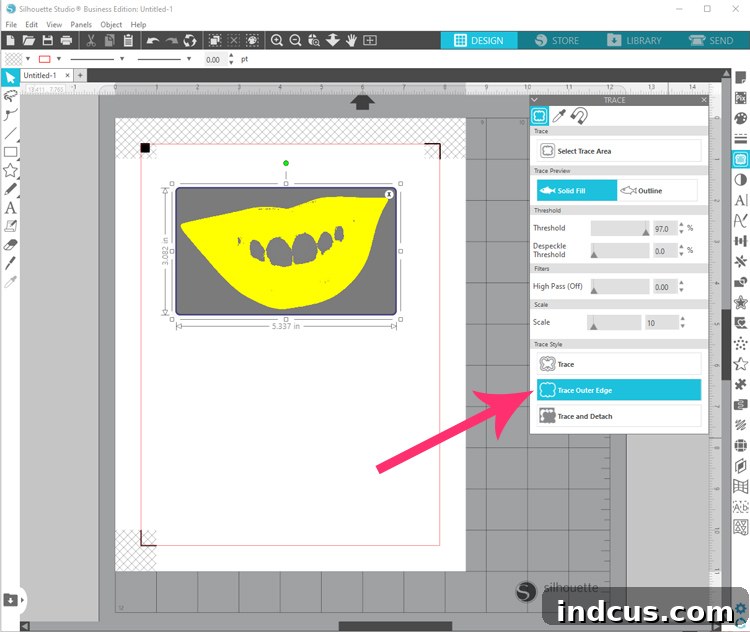
Refinement Tip: Adjust the “Threshold” slider in the Trace panel to capture as much detail as possible without picking up unwanted background noise. You can also use the “Trace Outer Edge” or “Trace Area” options depending on your specific graphic. Ensure your cut lines are smooth and accurate for a clean finish.
Step 4: Configure Page Settings and Add Registration Marks
Before printing, you need to set up your digital canvas. Adjust the page size within Silhouette Studio to match the dimensions of your printable heat transfer vinyl, which is typically 8.5″ x 11″. This ensures your design fits correctly on the sheet.
Next, and most importantly, add “Registration Marks” to your project. These marks are essential for the Silhouette Cameo’s “Print & Cut” feature. They allow the machine’s optical scanner to accurately locate where your design has been printed on the page, ensuring precise cutting around the graphic.
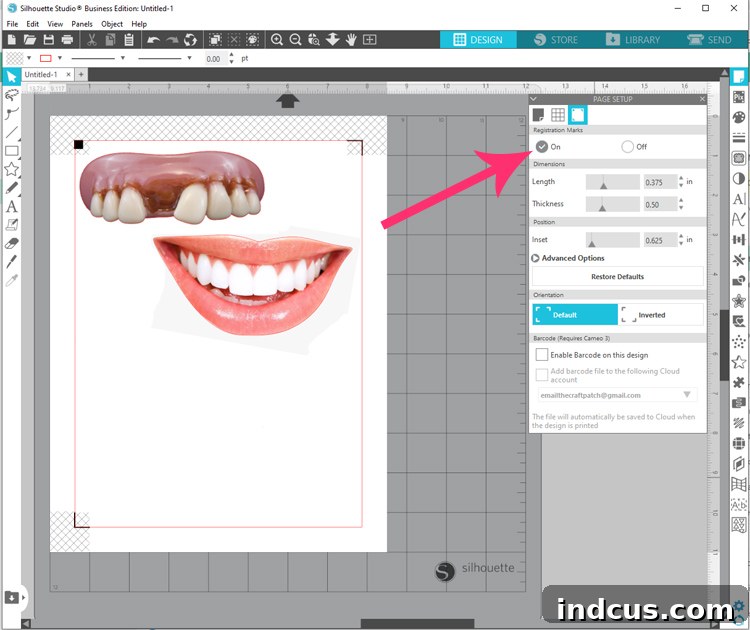
Expert Advice: Always double-check that your design is entirely within the red cut border and not overlapping the registration marks themselves. Any overlap could lead to cutting errors.
Step 5: Print Your Design on Printable Heat Transfer Vinyl
This step brings your digital design to life. Load the Silhouette Printable Heat Transfer Material into your color printer’s paper tray. This material typically has two sides: a plain, matte side for printing and a glossy or gridded backing. It is crucial to double-check that you are loading the vinyl in the correct direction to print on the plain, printable side, NOT the side with the grid lines or backing.
Once loaded correctly, send your design to your printer. Ensure your printer settings are optimized for high-quality color output on special media for the best results.
Step 6: Cut Your Printed Graphic with Silhouette Cameo
Now, for the magic of the cutting machine! Adjust the cut settings in Silhouette Studio specifically for “Printable Heat Transfer Material” (or “Printable HTV”). These settings ensure the blade cuts through the vinyl layer accurately without damaging the backing.
Carefully attach your printed printable HTV sheet to a cutting mat, aligning it with the mat’s guides. Load the cutting mat into your Silhouette Cameo machine. Once everything is in place, send the file to be cut. The machine will scan the registration marks and then precisely cut out your mouth graphic.
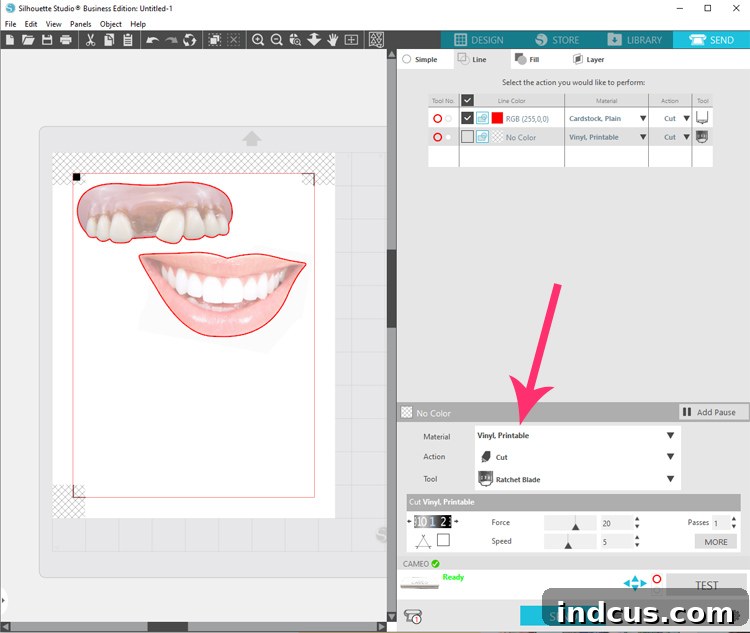
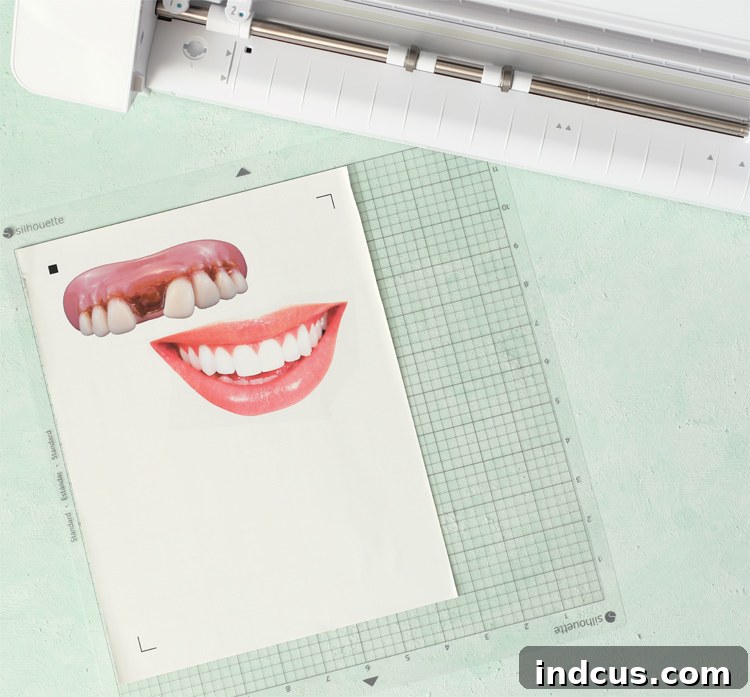
Pro Tip: Always perform a small test cut on a scrap piece of the same material first to confirm your blade settings are perfect. This saves you from wasting an entire sheet of printable HTV!
Step 7: Weed the Excess Heat Transfer Material
After your Silhouette Cameo has finished cutting, it’s time to “weed” your design. Carefully peel away the excess transfer material surrounding your mouth graphic. You should be left with only your desired design adhering to the clear film backing (the part that originally had the grid design, now on the back of your printed image).
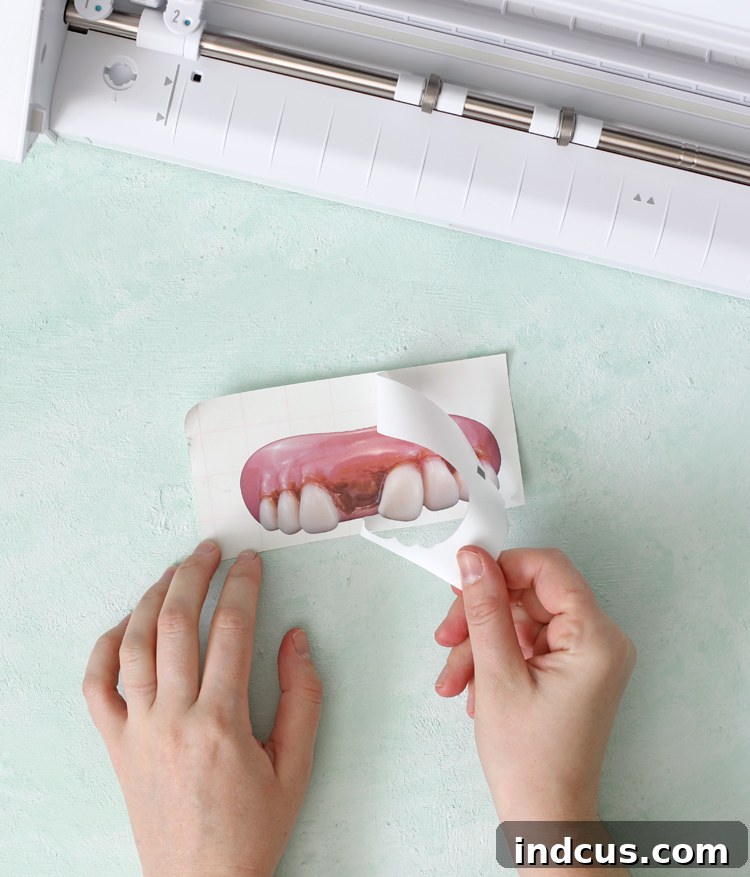
Weeding Made Easy: If you have a weeding tool, use it to carefully lift small interior pieces of the design. Take your time to ensure all unnecessary vinyl is removed, revealing your crisp mouth graphic.
Step 8: Apply the Mouth Graphic to Your Fabric Mask
This is where your funny face mask truly takes shape! Place your weeded mouth graphic face down onto your prepared fabric mask, ensuring the clear film backing (the grid side) is facing upwards. Carefully center the design on the mask for the best visual appeal. Once positioned, cover the design with a piece of clean white fabric. This acts as a pressing cloth, protecting both your HTV and your iron.
Set your iron to the “cotton” setting (or the recommended temperature for your specific printable HTV). Apply firm, even pressure with the hot iron over the design for approximately 30-40 seconds. Allow the design to cool completely before attempting to peel away the backing paper. If the design starts to lift, place the pressing cloth back down and iron for a few more seconds. Gently peel away the clear film backing, revealing your freshly applied, hilarious mouth graphic.
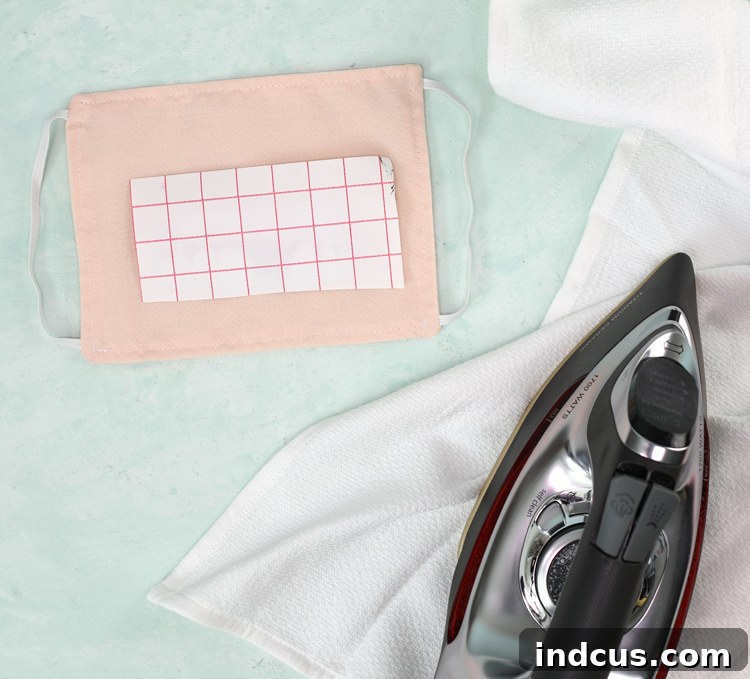
Crucial Tip: Ensure consistent heat and pressure across the entire design. Avoid sliding the iron, instead lift and press in different sections to prevent distortion. Cooling the HTV completely before peeling is vital for a strong bond.
Step 9: Finish Sewing Your Face Mask
With your custom graphic perfectly affixed, you can now complete your fabric face mask. Sew the pleats onto the sides of your mask, just as you would for a standard mask. Take care to fold and stitch neatly around your newly applied design, ensuring the pleats maintain their intended shape and function without obscuring your funny mouth.
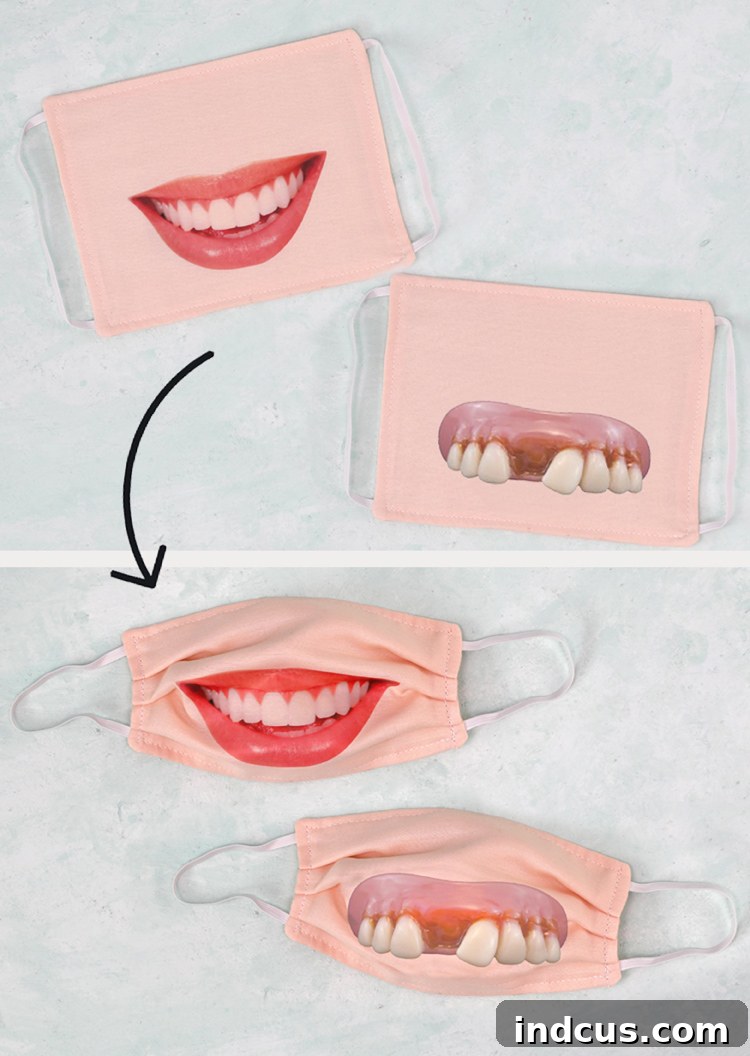
And there you have it! A delightfully silly, lighthearted project completed. In a world often filled with gravity and seriousness, why not inject a little humor and personality into your everyday accessories?
Care and Longevity of Your Custom Face Mask
Your printable HTV is designed to be washable, allowing you to maintain hygiene for your face mask. However, due to the repeated high-heat washes that fabric face masks often endure, the vinyl graphic may not last forever. And that’s perfectly okay! The joy and laughter it brings will make every wear worthwhile. To maximize the life of your design, we recommend washing your mask inside out in cold water on a gentle cycle and air-drying it whenever possible. Avoid harsh detergents or bleaching, which can degrade the vinyl over time.
Beyond Mouths: Unleashing Your Creativity
While a funny mouth graphic is a fantastic starting point, don’t stop there! The combination of your Silhouette Cameo and printable heat transfer vinyl opens up a world of possibilities for customizing your fabric masks. Consider adding:
- Mustaches and Beards: For instant facial hair transformations.
- Animal Noses: Turn yourself into a cat, dog, or bunny.
- Superhero Emblems: Show off your inner hero.
- Quotes or Text: Inspirational messages or funny sayings.
- Team Logos: Support your favorite sports team.
- Cartoon Characters: Bring beloved figures to life.
This project is not just about making a mask; it’s about making a statement, spreading cheer, and expressing your unique personality in a fun and functional way. Embrace the creative freedom and see what other fantastic designs you can come up with!
Found this project inspiring? Pin it to your favorite DIY or crafting board so you can easily find it again and share it with friends!
This engaging tutorial was made possible through a collaboration with Silhouette America. All creative concepts, opinions, and instructions shared are solely our own, aimed at inspiring your next crafting adventure.