Unleash Your Imagination: Crafting Custom 3D Designs with the Silhouette Alta 3D Printer
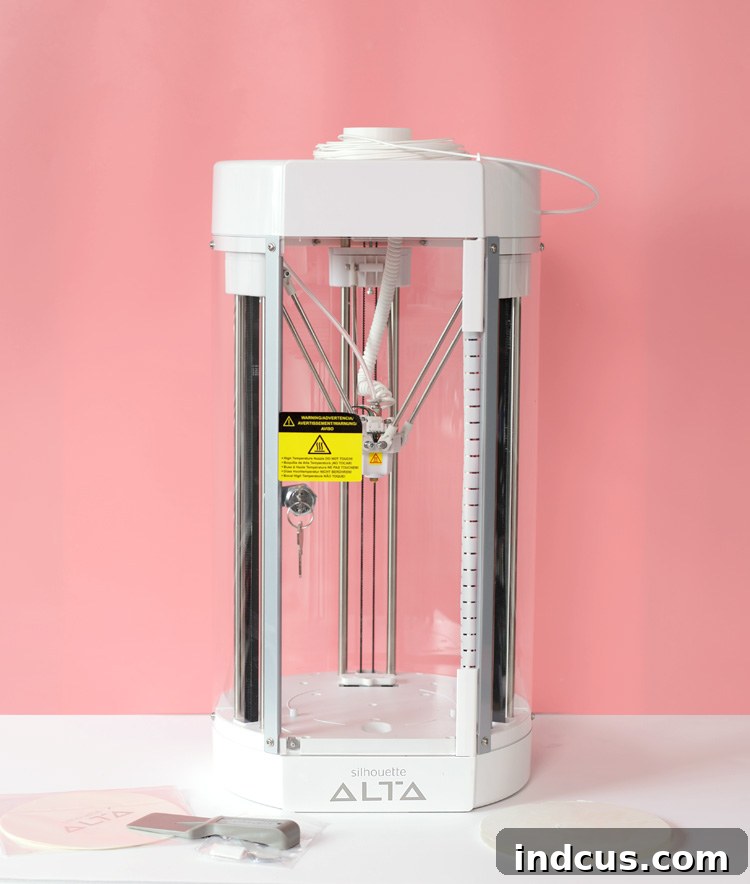
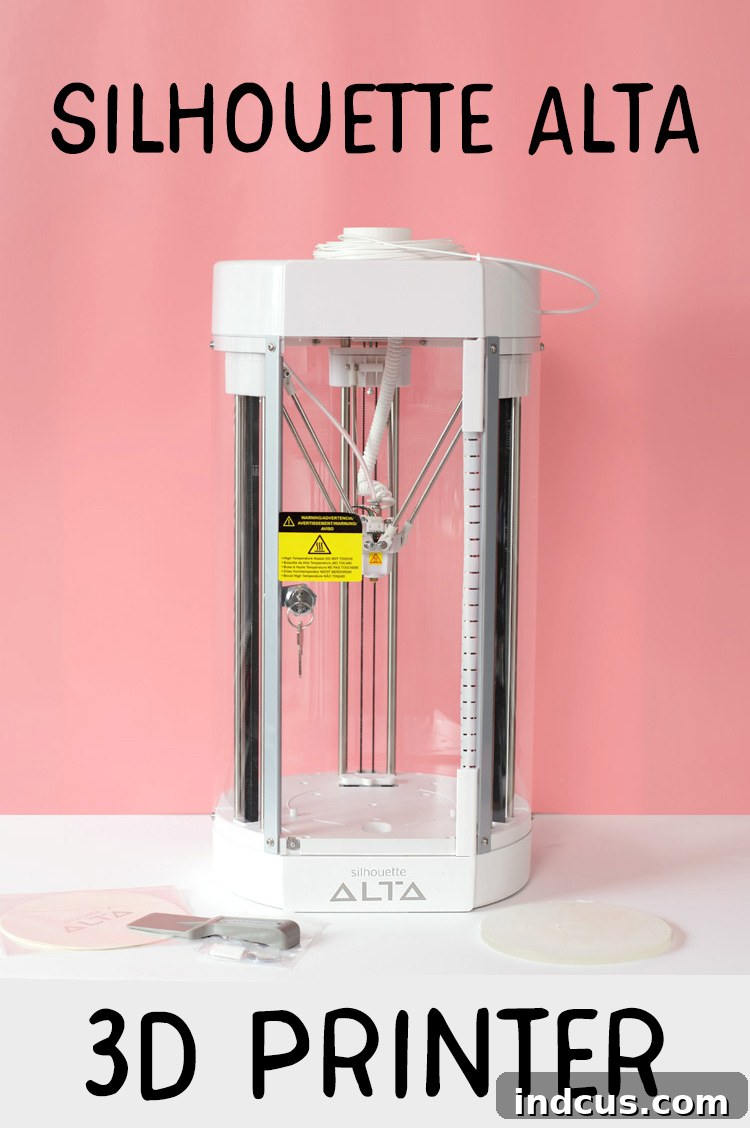
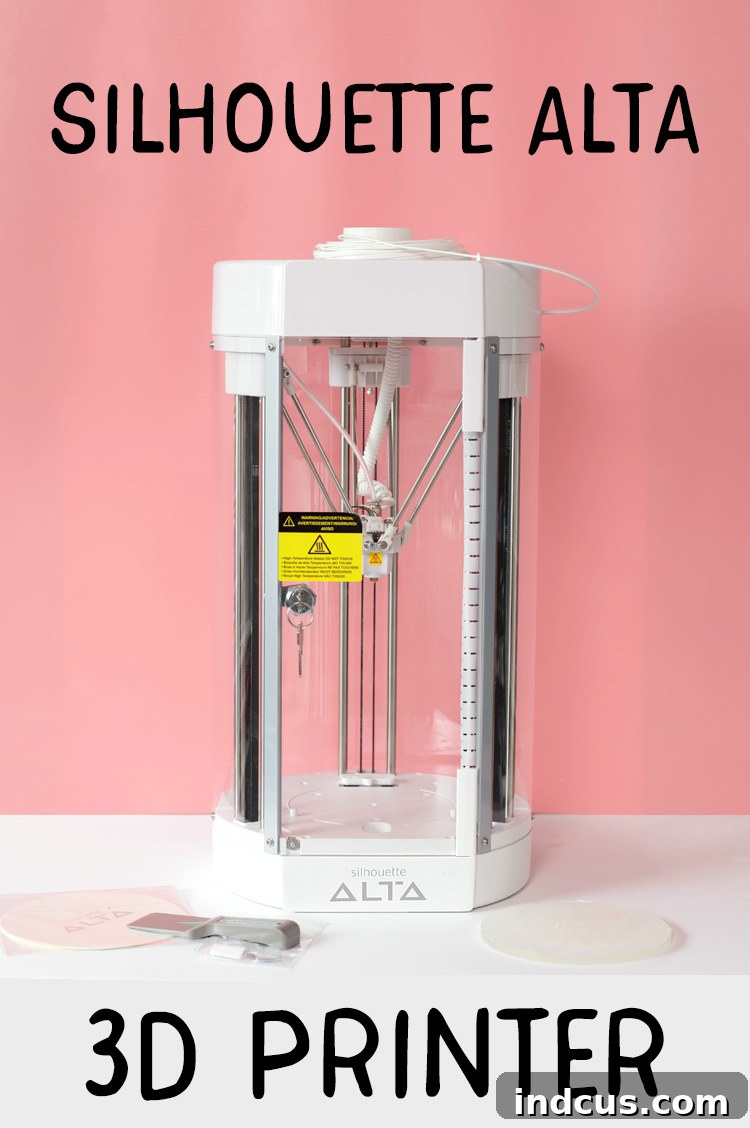
The world of crafting is continuously evolving, pushing the boundaries of what DIY enthusiasts can create right from their homes. Today, we’re diving into a revolutionary tool that’s transforming creative visions into tangible objects: the Silhouette Alta 3D printer. This innovative machine allows you to fabricate intricate, personalized designs out of plastic, opening up an entirely new dimension of crafting possibilities. Imagine taking a flat digital design and bringing it to life as a three-dimensional masterpiece – that’s the magic the Silhouette Alta delivers.
For crafters, makers, and hobbyists alike, the Silhouette Alta isn’t just another gadget; it’s an invitation to explore boundless creativity. Whether you dream of designing unique jewelry, custom home decor, personalized gifts, or functional prototypes, this desktop 3D printer puts the power of additive manufacturing directly into your hands. Its user-friendly approach makes advanced 3D printing technology accessible, even for those new to the concept.
We extend our sincere gratitude to Silhouette America for providing a review unit of the Silhouette Alta, enabling us to share this comprehensive insight with our readers.
Demystifying 3D Printing: How the Silhouette Alta Brings Designs to Life
At its core, the Silhouette Alta operates on a principle known as Fused Deposition Modeling (FDM), one of the most common and accessible forms of 3D printing. The process begins with a digital 3D model, which can be either downloaded from a vast library of designs or meticulously crafted by you using the intuitive Silhouette 3D software. Once your design is ready, the Alta takes over, transforming this digital blueprint into a physical object layer by intricate layer.
The machine utilizes a specialized plastic filament, typically PLA (Polylactic Acid), which is fed from a spool into the printer’s heated print head. This print head, often compared to a sophisticated hot glue gun, melts the plastic to a precise temperature. Guided by the data from the software, the print head moves with incredible accuracy across the build platform, extruding tiny, molten strands of plastic. These strands solidify almost instantly upon contact, building the object from the ground up, one wafer-thin layer at a time. This methodical, additive process ensures that every curve, angle, and detail of your original design is faithfully reproduced. While larger, more complex projects can take a few hours to complete, the anticipation of watching your custom creation materialize is an incredibly rewarding experience.
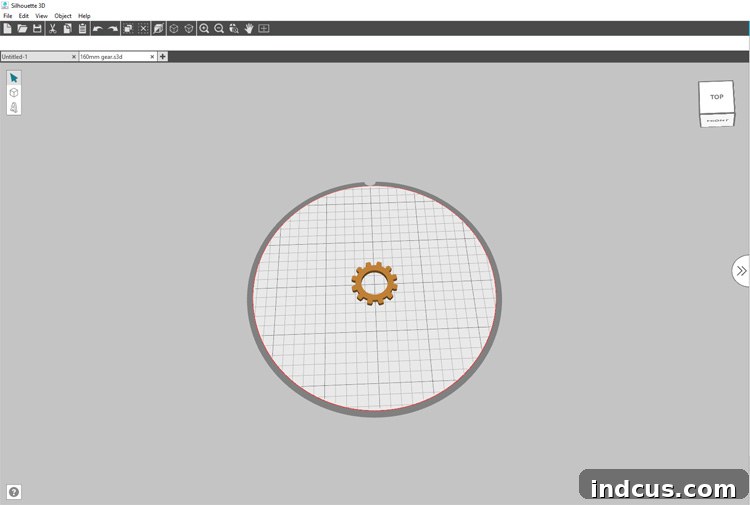
The image above showcases the user interface of the Silhouette 3D software. Here, you can see a brown gear shape, which represents a 3D design ready for printing, positioned within the circular grid of the available workspace. This interface provides comprehensive control over your designs. You have the flexibility to adjust various properties of your chosen object, such as its height, width, depth, and even intricate surface details. For a complete visual inspection, clicking the cube icon in the upper right-hand corner allows you to rotate and view your 3D model from every conceivable angle, ensuring perfection before printing. Once you’re satisfied with your design, a simple command sends it directly to the Silhouette Alta, mirroring the streamlined workflow experienced by users of Silhouette Cameo cutting machines.
Designing with Ease: The Power of Silhouette 3D Software
One of the most compelling features of the Silhouette Alta, particularly for seasoned crafters, is its remarkably user-friendly software. If you’re already familiar with Silhouette Studio, the software that powers Silhouette Cameo cutting machines, you’ll find the transition to Silhouette 3D incredibly smooth. The intuitive interface and similar design principles make it easy to adapt and start creating almost immediately. The biggest question many crafters have about 3D printing is, “Will I actually be able to design in 3D?” With the Alta, the resounding answer is YES!
The true brilliance of the Silhouette 3D software lies in its ability to leverage your existing creative assets. Imagine this: you’ve accumulated a vast library of 2D cut file designs in Silhouette Studio over the years. With the Silhouette Alta, these files are no longer confined to flat surfaces! Simply open any of your cherished cut files directly within the Silhouette 3D software, and a fascinating menu will appear, giving you options to transform your 2D shape into a 3D object. The software intelligently provides tools to extrude, emboss, or even hollow out your designs, instantly adding depth and dimension.
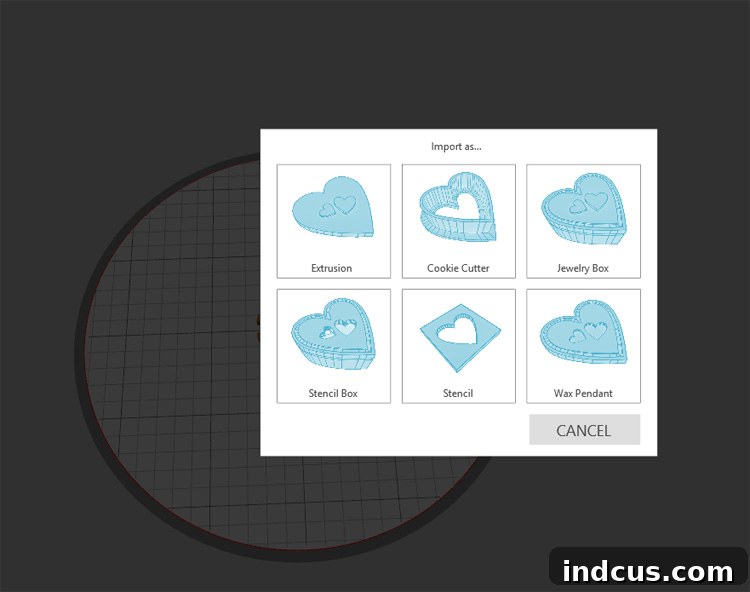
This seamless conversion from 2D to 3D is a game-changer for crafters. A simple outline can become a sturdy keychain, a decorative flourish can be transformed into an elegant charm, or a lettering design can be elevated into a dimensional sign. This capability dramatically expands your creative toolkit, allowing you to breathe new life into old designs and envision entirely new possibilities without needing to learn complex 3D modeling from scratch. The software also provides a collection of exclusive 3D designs to kickstart your printing journey, offering both inspiration and immediate project gratification.
Your Creative Journey Starts Here: What’s in the Box?
Unboxing the Silhouette Alta is an exciting experience, as it comes equipped with everything you need to embark on your 3D printing adventure right away. Silhouette has thoughtfully curated a comprehensive starter kit, ensuring you can begin crafting without immediate additional purchases. This attention to detail reflects their commitment to making advanced crafting technology accessible to everyone.
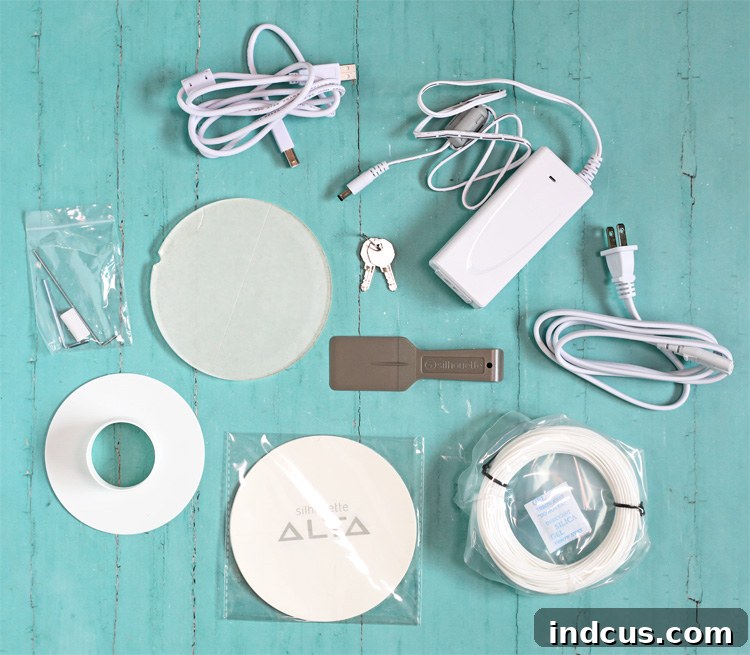
Upon purchasing the Silhouette Alta 3D printer, your package will include:
- The Silhouette Alta 3D Printer unit itself, a compact and elegant machine designed for desktop use.
- A Power Cable and USB Cable, essential for connecting your Alta to a power source and your computer.
- A Loose Filament Spool (white, approximately 60 g), providing your first material to experiment with.
- A Filament Spool Holder, designed to securely feed the plastic filament into the printer.
- The Platform (with an applied Platform Tape Sheet), the crucial surface where your 3D creations take shape.
- Replacement Platform Tape Sheets (10), ensuring you have plenty of fresh printing surfaces for future projects.
- Two Different Sizes of Hex Keys, vital tools for any minor machine adjustments or maintenance.
- A Nozzle Cleaner Tool, for keeping the print head clear and ensuring smooth filament extrusion.
- A Spatula Tool, indispensable for carefully removing your finished 3D prints from the build platform.
- Keys (to lock/unlock the case), adding a layer of security and protection for your machine.
- The Silhouette 3D Software, the powerful and intuitive program for designing and preparing your 3D models.
- 25 Exclusive 3D Designs, a collection of ready-to-print models to jumpstart your inspiration and practice.
Exploring Filament Options & Post-Processing
While the Silhouette Alta comes with a starter spool, the possibilities for color and finish are virtually endless. You can easily purchase additional filament directly from Silhouette America, which is available in a vibrant array of colors. This allows you to match your prints to specific project themes or simply experiment with different aesthetics. Beyond colored filaments, a fantastic aspect of 3D printing is the ability to customize your creations further through post-processing. Once your object has been printed, the plastic surface serves as an excellent canvas for various artistic treatments. You can paint your finished plastic shapes with acrylic paints, spray paints, or even apply finishes like glitter or sealant. This versatility means that even if you start with a basic white filament, you can achieve a custom color palette and intricate details that truly make your projects shine.
Getting Started: First Steps with Your Alta
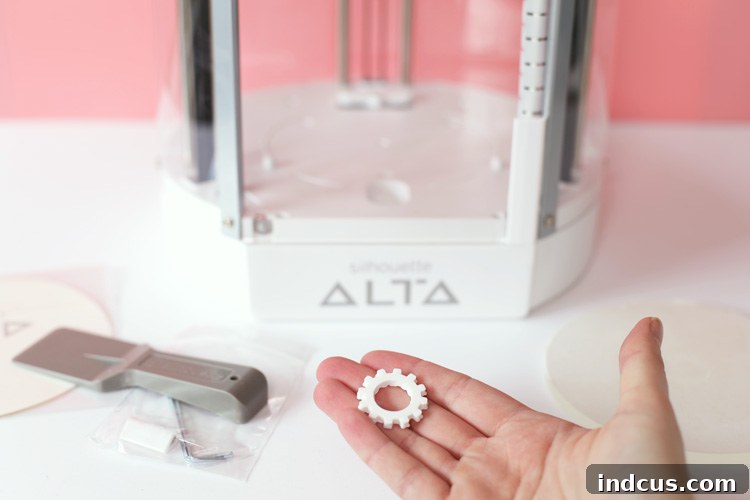
For those eager to dive in, setting up your Silhouette Alta for the first time is a straightforward process. To ensure a smooth beginning, our friend Alexis has created an incredibly helpful resource. We highly recommend watching her great video tutorial, which walks you through the initial setup and your first print with the Silhouette Alta. This guided approach will help you familiarize yourself with the machine’s components, software basics, and the satisfaction of completing your very first 3D print. The little gear, featured in one of our images, was among the first projects printed, serving as a testament to the Alta’s beginner-friendly nature.
Inspiring Projects and Creative Applications for Your Silhouette Alta
The true power of the Silhouette Alta lies in its versatility. Once you understand the basics, a world of creative projects unfolds before you. Here are just a few ideas to spark your imagination and demonstrate the breadth of what you can achieve:
- Personalized Jewelry: Design custom earrings, pendants, bracelet charms, or even intricate beads. You can create unique pieces that reflect your style or make thoughtful, handmade gifts.
- Home Decor Accents: Print small vases, decorative coasters, intricate wall art elements, unique candle holders, or custom knob covers for furniture.
- Party & Event Supplies: Craft personalized cake toppers, unique party favors, custom stencil designs for cookies, or small decorative elements to match any theme.
- Functional Organizers: Create bespoke desk organizers, small trays for crafting supplies, phone stands, earbud holders, or custom inserts for drawers.
- Educational Tools: Design and print anatomical models, geometric shapes for math lessons, or tactile learning aids for children.
- Prototyping for Other Crafts: Use the Alta to create custom molds for resin casting, unique stamps for polymer clay, or precisely shaped components for mixed-media projects.
- Figurines & Miniatures: Bring characters and tiny landscapes to life, perfect for dioramas, gaming, or collectible displays.
The ability to create custom, three-dimensional components also allows for seamless integration with other crafting techniques. Imagine printing a unique 3D base for a shadow box, then adorning it with vinyl cut by your Silhouette Cameo. Or creating custom stencils for fabric painting, knowing they will be durable and reusable. The Alta truly amplifies your existing crafting skills, acting as a powerful companion in your creative studio.
The Future of Crafting is Here
The Silhouette Alta represents a significant leap forward in making sophisticated technology accessible to the everyday crafter. It democratizes 3D printing, moving it from the realm of specialized engineers to the creative desks of hobbyists and small business owners. This machine is more than just a tool; it’s a gateway to innovation, enabling you to bring complex ideas to life with unprecedented ease and personalization. It fosters a spirit of experimentation and empowers you to produce professional-quality custom items without the need for outsourcing.
So, what are your thoughts? Can you envision the Silhouette Alta becoming an integral part of your crafting arsenal? The potential is truly limitless, and we’re incredibly excited to share more innovative Alta projects and tutorials with you in the near future. Stay tuned for upcoming inspiration, tips, and step-by-step guides that will help you unlock the full creative power of your Silhouette Alta 3D printer. Get ready to turn your wildest plastic crafting dreams into reality!