Craft Your Own Disney Magic: DIY Disneyland Shirts with Heat Transfer Vinyl and Your Silhouette Machine
Embarking on a magical journey to Disneyland is an unforgettable experience, and what better way to amplify the enchantment than with custom-designed shirts? As avid crafters, we know the joy of adding a personal touch to every adventure. Our recent family trip to Disneyland sparked a creative spree, resulting in unique, handmade shirts that captured the spirit of each family member’s favorite characters. Today, we’re thrilled to share these three distinct Disney shirt designs, complete with free PNG cut files, so you can easily replicate them and create your own cherished memories!
Creating your own Disneyland shirts is not just about saving money; it’s about infusing your trip with personality, expressing your unique style, and building anticipation even before you step through the park gates. Imagine the delight on your children’s faces when they wear a shirt they helped design, or the compliments you’ll receive on your one-of-a-kind apparel. This comprehensive guide will walk you through the process, from selecting your materials to perfectly pressing your designs, ensuring your DIY Disney shirts are park-ready and pixie-dust approved.
Please note: This post may contain affiliate links, which means we may earn a small commission if you make a purchase through them, at no extra cost to you. These links help support our crafting endeavors!
The Magic of Custom Disney Apparel: Why DIY Your Park Shirts?
Venturing to Disneyland is an investment, and while the official merchandise is tempting, crafting your own shirts offers a multitude of benefits that elevate your experience. First and foremost is the incredible opportunity for personalization. Forget generic designs; with a Silhouette machine and heat transfer vinyl, you have the power to bring any Disney-inspired vision to life. Want a specific quote from your favorite character? Done. A subtle nod to a lesser-known animated gem? Absolutely. The possibilities are boundless.
Beyond customization, cost-effectiveness is a major draw. Park shirts can be quite pricey, especially when outfitting an entire family. DIY allows you to control your budget without compromising on style or quality. You choose the blank apparel, ensuring comfort and fit, and select premium heat transfer vinyl for designs that last. This creative process also becomes a cherished part of your pre-trip excitement, a fun family activity that builds anticipation and strengthens bonds. Plus, you’ll leave the park not just with memories, but with unique, handmade souvenirs that hold sentimental value far beyond anything store-bought.
Essential Tools for Crafting Your Perfect Disney Shirts
To embark on this exciting DIY journey, you’ll need a few key tools and materials. Understanding their purpose will ensure a smooth and successful crafting experience.
Heat Transfer Vinyl (HTV) Explained
Heat Transfer Vinyl, or HTV, is a special type of vinyl that can be applied to fabrics using heat. It comes in a vast array of colors, finishes, and textures, from classic matte and glossy to dazzling glitter, metallic, holographic, and even glow-in-the-dark options. HTV is composed of several layers: a heat-activated adhesive layer, the vinyl design layer, and a clear carrier sheet that protects the vinyl and holds the design in place during cutting and application. It’s durable, machine-washable (when properly applied), and perfect for personalizing t-shirts, hoodies, bags, and more. For Disney shirts, HTV allows for crisp, professional-looking designs that truly pop.
Your Crafting Companion: The Silhouette Machine
A Silhouette machine (or a similar electronic cutting machine like a Cricut) is the heart of this DIY project. This incredible device connects to your computer and uses a small blade to precisely cut intricate designs from various materials, including HTV. It takes the tediousness out of hand-cutting complex patterns and ensures a professional finish every time. Silhouette Studio software, which accompanies the machine, allows you to import designs (like the PNG files we’re providing), trace them, size them, and prepare them for cutting. Its versatility makes it an indispensable tool for any serious crafter looking to personalize apparel, create decals, paper crafts, and so much more.
General Heat Transfer Vinyl Application Guide for Flawless Results
While specific settings may vary slightly depending on your vinyl type and machine, the core process for applying HTV remains consistent. Follow these steps for durable and vibrant custom Disney shirts:
- Prepare Your Design: Open the PNG file in your Silhouette Studio software. Use the trace tool to create clean cut lines around your design. This step is crucial for the machine to recognize where to cut.
- Mirror Your Image: This is a critical step for HTV! Always mirror (flip horizontally) your design before sending it to cut. Since you’ll be placing the vinyl shiny-side down, mirroring ensures your design appears correctly once pressed onto the shirt.
- Adjust Cut Settings: Select the appropriate cut settings for your specific type of heat transfer vinyl. Each vinyl type (glitter, smooth, metallic) has different thickness and density, requiring specific blade depth, force, and speed settings. Consult your vinyl manufacturer’s recommendations or perform a test cut. For example, glitter vinyl often requires a deeper blade setting and higher force than standard smooth HTV.
- Load Your Vinyl: Place your heat transfer vinyl onto your cutting mat, shiny side (carrier sheet) down. Load the mat into your Silhouette machine.
- Execute the Cut: Send your mirrored design to the Silhouette machine to cut. Once the cut is complete, carefully remove the vinyl from the mat.
- Weed the Design: This is the process of removing all the excess vinyl that is not part of your design. Use a weeding tool (or a hook tool) to carefully peel away the surrounding vinyl, leaving only your desired image or text on the clear carrier sheet. Take your time to ensure all small pieces are removed.
- Pre-Press Your Shirt: Before applying the vinyl, pre-press your blank shirt with a heat press or iron for 5-10 seconds. This removes any moisture and wrinkles, creating a smooth, flat surface for optimal vinyl adhesion.
- Position Your Design: Carefully place your weeded vinyl design onto your shirt, with the shiny carrier sheet facing up. Ensure it is centered and positioned exactly where you want it.
- Apply Heat: Cover the design with a Teflon sheet, parchment paper, or a thin cotton cloth (like a flour sack towel) to protect the vinyl and your iron/heat press. Apply heat according to your vinyl’s instructions (temperature and time). For an iron, use firm, even pressure, moving slowly across the entire design. Avoid sliding the iron.
- Peel the Carrier Sheet: Once the vinyl has been heated for the recommended time, refer to your vinyl’s instructions for peeling. Some HTV is “hot peel” (peel immediately while hot), while others are “cold peel” (allow to cool completely before peeling). Carefully peel back the carrier sheet at an angle. If any part of the vinyl lifts, lay the carrier sheet back down and re-apply heat.
- Final Press (Optional but Recommended): For extra durability, you can remove the carrier sheet and place your protective cover back over the design, then press for another 5-10 seconds. This helps to fully integrate the vinyl into the fabric fibers.
Edna Mode: A Super Designer’s Choice for Your Disneyland Shirt
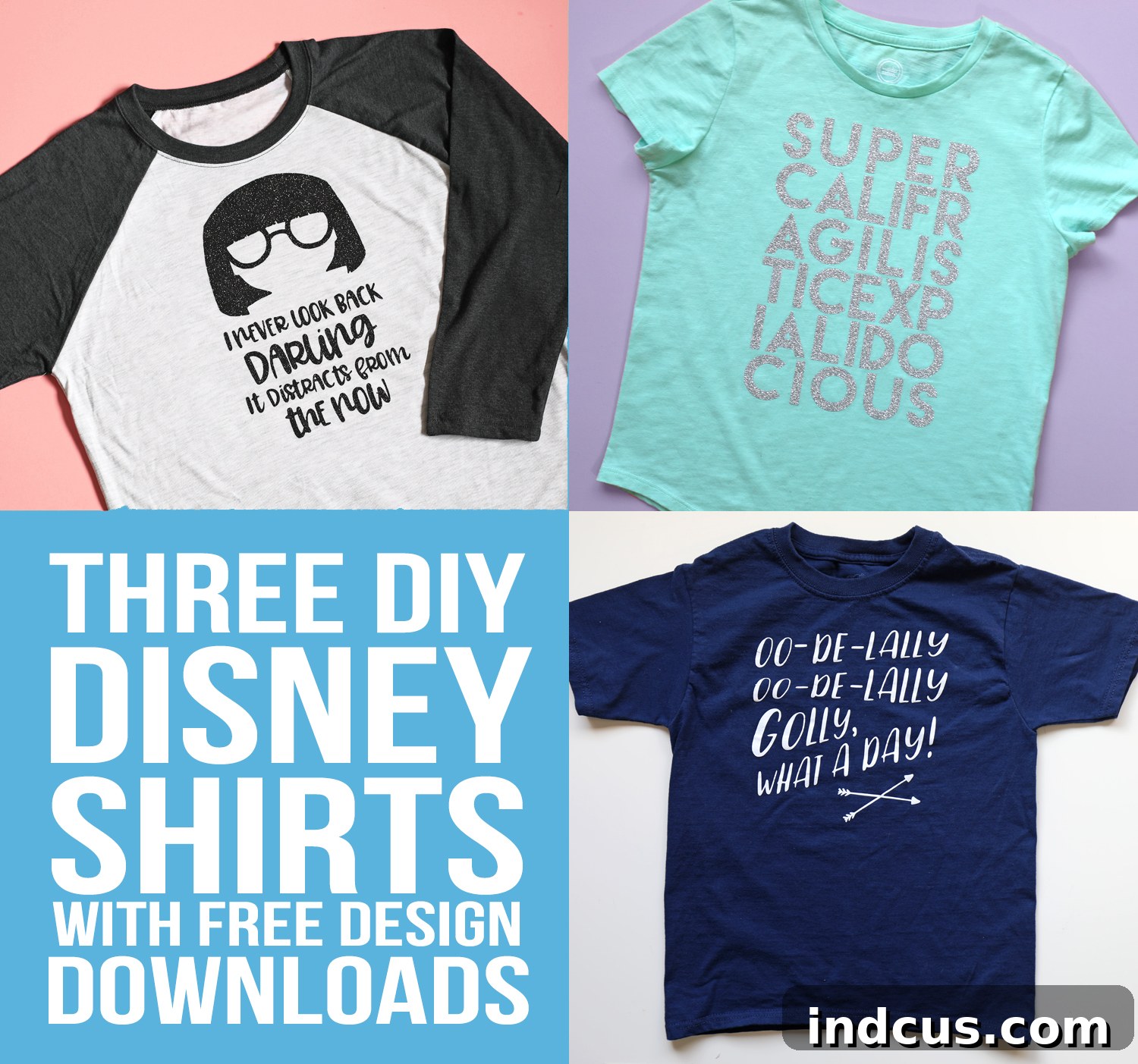
As a personal favorite, Edna Mode from Disney-Pixar’s The Incredibles was my undeniable choice for a Disneyland shirt. Her iconic quote, “No capes!” perfectly encapsulates her no-nonsense, yet stylish, demeanor. This design offers a sophisticated and humorous tribute to the fashion genius of the superhero world, making it a standout choice for any Incredibles fan.
For this fabulous creation, I chose a comfortable blank baseball sleeve tee from Hobby Lobby. The contrasting sleeves added a chic touch, providing a perfect canvas for Edna’s bold statement. The design itself was cut from black glitter HTV from Expressions Vinyl. The photos truly do not do justice to its magnificent sparkle! It catches the light beautifully, adding an extra layer of pizzazz that Edna herself would undoubtedly approve of. And, of course, absolutely no capes were harmed in the making of this shirt.
To craft your very own Edna Mode masterpiece, download the high-quality PNG cut file here.
Glitter HTV Specific Application Instructions:
While the general guide applies, glitter HTV has unique characteristics that require slight adjustments:
- Open the PNG file in Silhouette Studio.
- Use the trace tool to meticulously outline the shapes for precise cutting.
- Remember to mirror your image! This is non-negotiable for all HTV.
- Adjust cut settings specifically for glitter vinyl. Glitter is thicker than standard HTV, so it often requires a deeper blade setting and more force. For my Silhouette, I found a ratchet blade setting of 4, speed of 4, and thickness (force) of 18 worked perfectly. Always test a small area first if unsure.
- Insert your glitter HTV into the Silhouette machine with the shiny carrier sheet facing down.
- Cut your design, then carefully weed away all the excess vinyl to reveal your sparkling design.
- Place your weeded design on the shirt with the shiny carrier sheet facing up.
- Cover with a flour sack dish towel or multi-use paper for protection.
- Iron at 325°F for 10-15 seconds, applying firm, even pressure across the entire design. Glitter HTV typically requires slightly higher temperature and/or longer press time than smooth HTV for proper adhesion. Allow to cool slightly before attempting a warm peel.
Oo-De-Lally! A Robin Hood Inspired Disneyland Shirt
My son, a fan of classic Disney animation, chose this delightful Robin Hood reference for his Disneyland shirt. The cheerful phrase “Oo-De-Lally” instantly evokes the whimsical spirit of the Sherwood Forest crew and is perfectly fitting for a joyous day exploring the park. It’s a fun, lighthearted design that is instantly recognizable to fellow fans and brings a touch of nostalgic charm. Golly, what a day indeed!
For this simple yet charming design, I sourced a cheap navy blue tee from Walmart, proving that creating custom Disney shirts doesn’t require expensive base garments. The contrast of the crisp white design against the deep navy blue made the “Oo-De-Lally” phrase truly pop. I used standard white heat transfer vinyl, which is incredibly easy to work with and provides excellent durability. The simplicity of this design makes it a fantastic project for beginners and a quick win for seasoned crafters.
To bring the spirit of Sherwood Forest to your wardrobe, download the free Robin Hood PNG file here.
Standard Heat Transfer Vinyl Application Instructions:
These instructions are tailored for regular, smooth HTV, which is generally more forgiving than glitter vinyl:
- Open the PNG file in Silhouette Studio.
- Use the trace tool to accurately outline the design elements.
- Mirror your image before cutting!
- Adjust cut settings for standard heat transfer vinyl. This typically involves a shallower blade depth and less force than glitter vinyl. Check your vinyl’s specific recommendations.
- Insert your vinyl into the Silhouette machine with the shiny carrier sheet facing down.
- Cut the design and then carefully weed away any excess vinyl.
- Place the weeded design onto your shirt, ensuring the shiny carrier sheet is facing up.
- Cover the design with a protective layer, such as a flour sack dish towel or multi-use paper.
- Iron at 305°F for 10-15 seconds, applying firm, even pressure. Most standard HTV is a warm or cold peel, so allow it to cool slightly or completely before peeling the carrier sheet as per manufacturer instructions.
Mary Poppins: Practically Perfect in Every Way DIY Shirt
My imaginative tween daughter was set on a Mary Poppins shirt, and what better phrase to capture the essence of this magical nanny than “supercalifragilisticexpialidocious”? This iconic, tongue-twisting word brings a whimsical and cheerful touch to any outfit, making it a practically perfect choice for a day at Disneyland. It’s a fantastic conversation starter and a joyful tribute to one of Disney’s most beloved characters.
For this truly supercalifragilisticexpialidocious design, we chose to cut the lengthy word out of shimmering silver glitter heat transfer vinyl. The sparkle perfectly complemented the enchanting nature of Mary Poppins herself. This design turned out absolutely darling against a soft mint-colored tee, creating a fresh, elegant, and playful look. The glitter vinyl adds that extra touch of magic, ensuring the shirt stands out in a crowd.
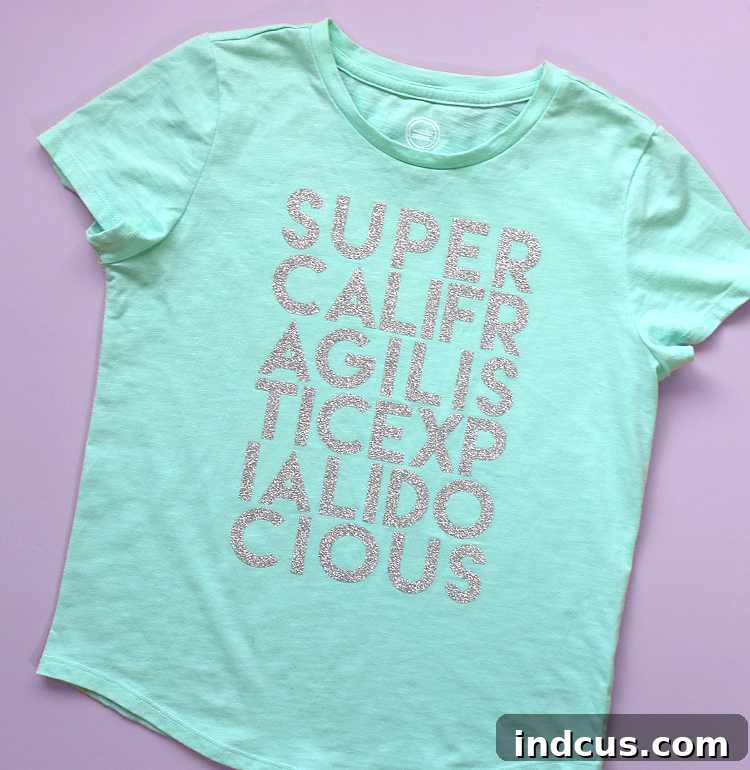
To create your own practically perfect Mary Poppins shirt, download the PNG file for this design here.
For the application of this silver glitter heat transfer vinyl design, please refer to the detailed instructions provided earlier in the “Glitter HTV Specific Application Instructions” section. Remember to adjust your Silhouette machine settings accordingly for glitter vinyl to ensure a clean cut and excellent adhesion.
Tips for Success and Longevity of Your DIY Disney Shirts
To ensure your custom Disneyland shirts look fantastic throughout your trip and for many adventures to come, here are some invaluable tips:
- Always Test Cut: Before cutting your full design, perform a small test cut with your chosen vinyl and settings. This saves material and prevents frustration.
- Quality Matters: Invest in good quality heat transfer vinyl. Reputable brands are easier to weed, adhere better, and last longer.
- Proper Pressure: Whether using a heat press or an iron, consistent, firm pressure is key for the HTV adhesive to properly bond with the fabric.
- Care Instructions: To maximize the life of your HTV shirts, turn them inside out before washing. Wash in cold water on a gentle cycle, and tumble dry on low heat or, ideally, hang to dry. Avoid harsh detergents, bleach, and direct ironing on the vinyl design.
- Have Fun! The most important tip is to enjoy the creative process. These shirts are a labor of love and a testament to your crafting skills.
Unleash Your Inner Disney Designer!
Creating your own custom Disneyland shirts with heat transfer vinyl and a Silhouette machine is a rewarding experience that adds a truly personal touch to your magical vacation. From iconic characters like Edna Mode and Robin Hood to beloved phrases from Mary Poppins, the possibilities for unique and personalized apparel are endless. We hope these free designs and detailed instructions empower you to unleash your creativity and craft shirts that will be cherished long after your Disney adventure concludes.
So, gather your materials, fire up your Silhouette, and get ready to add an extra layer of magic to your next Disneyland visit. Share your creations with us – we’d love to see what enchanting designs you come up with!