Unlock Your Creativity: Free Sewing Themed Cut File for Silhouette & Beyond
Welcome, fellow crafters and sewing aficionados! Are you ready to infuse a touch of handmade charm into your projects? We’re thrilled to share an absolutely delightful and versatile design that celebrates the art of sewing. Whether you’re a seasoned Silhouette user, a proud Cricut owner, or simply love to create beautiful things with printable graphics, this free sewing themed cut file is designed to spark your imagination and help you craft something truly unique.
This exclusive design is available in two convenient formats to cater to all your creative needs: a dedicated cut file (compatible with Silhouette machines and many other cutting machines that use SVG/DXF formats) for precision vinyl projects, and a high-quality PNG file for a multitude of printable and digital endeavors. Get ready to transform ordinary items into personalized treasures!
Unleashing Creativity: Projects Galore with Your Free Design
The beauty of this sewing themed design lies in its incredible versatility. Imagine the possibilities! For those who love working with cutting machines and heat transfer vinyl (HTV) or adhesive vinyl, this cut file opens doors to endless customization:
- Custom Apparel: Design charming t-shirts, cozy sweatshirts, or personalized aprons for yourself or as thoughtful gifts for sewing friends.
- Stylish Accessories: Elevate plain tote bags, canvas purses, and even baseball caps with a unique sewing motif.
- Home Decor: Create inspiring wall art, decorative pillows, or unique iron-on patches for fabric storage bins in your craft room.
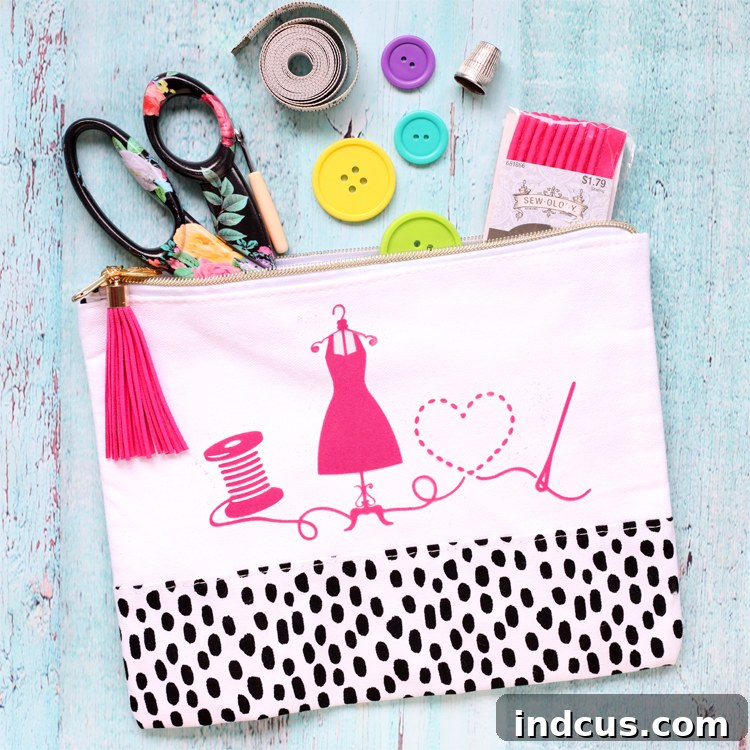
- Practical Organization: As we’ll demonstrate, zippered pouches become adorable organizers for sewing notions, craft supplies, or everyday essentials.
But the fun doesn’t stop there! The included PNG file expands your creative horizons even further:
- Printable Art: Design beautiful framed prints for your sewing space, printable labels for your fabric stash, or custom stationery.
- Greeting Cards: Craft unique handmade cards to celebrate a fellow crafter’s birthday, a new sewing machine, or simply to say “thinking of you.”
- Digital Projects: Use it for scrapbooking layouts, blog graphics, or as a charming element in your digital planner.
- Stencils & Templates: Easily create templates for painting, embroidery, or other craft techniques.
Featured Project: Crafting a Darling Zippered Sewing Notions Pouch
To inspire you with a tangible example, we decided to use this enchanting design to embellish a simple, yet incredibly functional, zippered pouch. This project is not only satisfying to make but results in a beautiful accessory perfect for organizing those essential sewing notions – needles, thread, thimbles, and small scissors – keeping them tidy and accessible whether you’re at home or on the go. Let’s walk through the steps to create your own personalized sewing notions pouch using heat transfer vinyl with your Silhouette machine.
Materials You’ll Need:
- Your free sewing themed cut file (SVG/DXF)
- Silhouette cutting machine (e.g., Cameo, Portrait)
- Heat Transfer Vinyl (HTV) of your choice (we used pink flocked HTV for a unique texture!)
- Zippered pouch (or a t-shirt, tote bag, etc.)
- Weeding tools (hook or straight pin)
- Ruler or measuring tape
- Iron or heat press
- Parchment paper or Teflon sheet (optional, but recommended)
Step-by-Step Tutorial:
Follow these easy steps to bring your sewing themed pouch to life:
Step 1: Prepare and Cut Your Heat Transfer Vinyl
For Silhouette users, begin by downloading the appropriate cut file (usually SVG or DXF) from our link below and opening it in your Silhouette Design Studio software. Ensure your design is correctly sized to fit your pouch or chosen item. When working with heat transfer vinyl, one crucial step is to mirror your image horizontally. This is vital because when you press the vinyl onto your fabric, it will be flipped, and if not mirrored, your text or directional elements will appear backward. Next, adjust your cut settings according to the type of HTV you are using. Different vinyl types (flocked, glitter, smooth, metallic) require specific blade depths, forces, and speeds. Always consult your vinyl manufacturer’s recommendations or perform a test cut to achieve perfect results.
Finally, load your heat transfer vinyl into your Silhouette machine. Remember this golden rule for HTV: load it with the shiny side DOWN. The shiny side is the clear carrier sheet that protects your design and will be peeled off later. For this project, we opted for a beautiful pink flocked heat transfer vinyl from Expressions Vinyl. Flocked vinyl offers a lovely fuzzy, raised texture that adds a luxurious and tactile dimension to any project, making it truly stand out. Once loaded, send your design to your machine for cutting.
Step 2: Expertly Weed Your Design
Once your Silhouette machine has finished cutting, it’s time for the “weeding” process. Weeding involves carefully removing all the excess vinyl material from around and within your design, leaving only the parts you want to transfer onto your project. This requires a steady hand and good lighting. Start by gently peeling off the larger sections of vinyl around the main design. For smaller, more intricate pieces, like the centers of letters or tiny details, use a specialized weeding tool (a hook tool works wonders!) or even a straight pin, as demonstrated. Take your time to ensure every unwanted piece of vinyl is removed, leaving your design clean and crisp on the clear backing sheet. This attention to detail will ensure your final project looks professional and polished.
Step 3: Precise Placement of Your Design
With your design perfectly weeded, it’s time to position it on your zippered pouch. Lay your pouch flat and smooth out any wrinkles. Carefully center the vinyl design onto the bag, ensuring the clear plastic side is facing up. This clear sheet is your carrier and will protect your design during heat application. Precision is key here for a professional finish! We always recommend using a ruler or measuring tape to ensure your design is perfectly centered and evenly spaced. Take a moment to step back and eyeball it, making sure it looks balanced and aesthetically pleasing on your chosen surface. Once you’re satisfied with the placement, you’re ready for the final step!
Step 4: Heat Application and Finishing Touches
Now for the magic moment! If you’re using a standard household iron, set it to approximately 320°F (or the cotton/linen setting, ensuring steam is OFF). Place a piece of parchment paper or a thin pressing cloth over your design for added protection, especially if using an iron. Apply medium, firm pressure evenly over the entire design for 15-20 seconds. If your design is larger than your iron’s plate, press in sections, overlapping slightly, ensuring each area receives adequate heat and pressure. It’s crucial to apply consistent, even pressure, not just heat, for the vinyl to properly adhere to the fabric fibers. If using a heat press, always refer to your HTV manufacturer’s recommended temperature and pressing time, as these can vary.
Once you’ve applied the heat, let the design cool completely. This is a critical step, especially for “cool peel” HTV types like flocked vinyl. Once completely cool to the touch, slowly and carefully peel away the clear plastic carrier sheet. If any part of the vinyl lifts with the carrier, simply lay it back down, cover with your parchment paper, and reapply heat and pressure for another 10-15 seconds, then let it cool and try again. And just like that, your custom sewing notions pouch is complete and ready to organize your craft supplies in style!
Care Instructions for Your HTV Projects:
To ensure the longevity of your customized items, always wash them inside out in cold water with a mild detergent. Tumble dry on low or, ideally, hang to dry. Avoid bleach, harsh detergents, and direct ironing over the vinyl design. Following these simple care tips will help your beautiful creations last for years to come!
More Inspiring Ideas for Your Sewing Themed Design
Our passion for this design is truly limitless! Beyond the adorable zippered pouch, we envision it gracing countless other projects. Imagine creating a matching personalized t-shirt for yourself or a friend who shares your love for needle and thread. Consider crafting a custom tote bag for carrying sewing supplies to classes or guild meetings. The possibilities are truly endless, and this design makes for perfect handmade gifts for any sewing enthusiast in your life.
Let your creativity be your guide! Use this versatile design to celebrate your love for sewing, organize your craft space, or surprise a fellow crafter with a thoughtful, personalized gift. We can’t wait to see what amazing projects you’ll create with our free sewing themed cut file.
Download Your Free Sewing Themed Design Here!
Ready to start crafting? We’ve made it easy for you to access this fantastic design. Click the buttons below to download your preferred file format. Whether you’re cutting vinyl with your Silhouette or printing beautiful graphics, we’ve got you covered!
Download the Silhouette Cut File (SVG/DXF) Here
We hope you enjoy this design and find countless creative applications for it! Don’t forget to share your finished projects with us and inspire other crafters.
Don’t forget to Pin the image below to save this idea for later and share with your crafting community!