Unlock Your Crafting Potential: Create Custom 3D Printed Label Holders with Silhouette Alta – Free File Included!
The world of 3D printing has revolutionized how we approach DIY projects, bringing innovative customization right to our fingertips. Imagine being able to conjure tangible objects from mere digital designs, transforming simple plastic filament into practical and beautiful tools for your home. This revolutionary technology is now more accessible than ever, especially for crafters and hobbyists who thrive on personalized solutions.
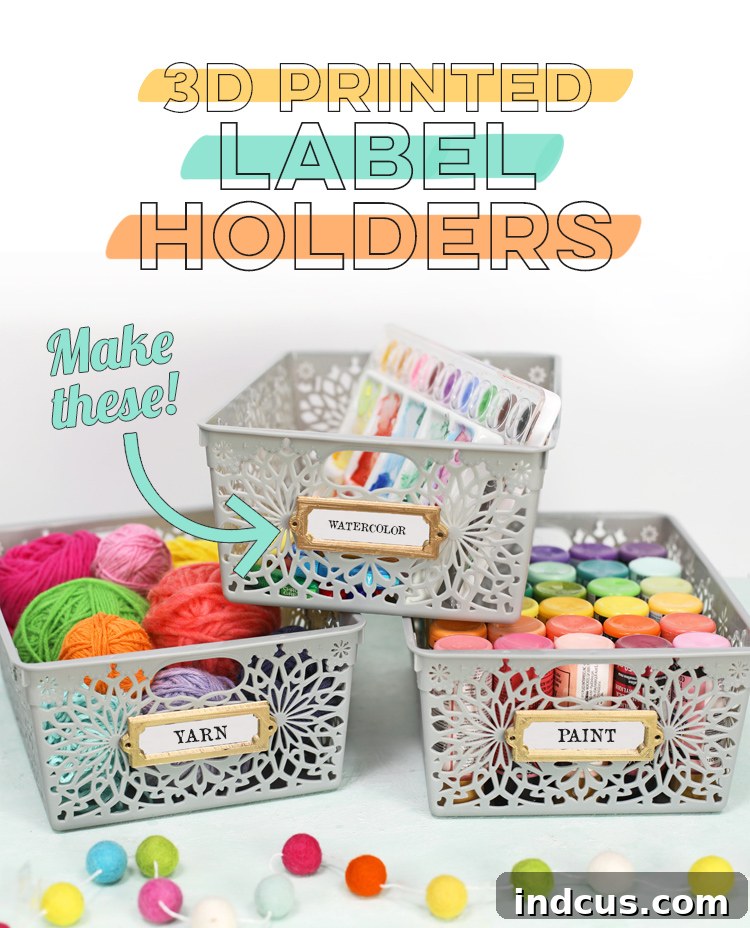
Today, we’re diving into an incredibly satisfying project that combines the magic of 3D printing with the practicality of home organization: creating custom label holders for your storage bins. Say goodbye to flimsy paper labels or generic, store-bought options that never quite fit your aesthetic. With a 3D printer, specifically the user-friendly Silhouette Alta, you can design and produce durable, perfectly tailored label holders that elevate your organizational efforts.
And the best part? We’re not just showing you how; we’re giving you the exact 3D printer file for free! This means you can download, print, and customize your own set of label holders today, making it incredibly easy to start your journey into functional 3D printing.
This post is sponsored by Silhouette America, a leading innovator in crafting technology. All ideas and opinions expressed here are genuinely my own. Please note that affiliate links are included throughout this article. This means that when you make a purchase through my provided links, I may earn a small commission at no additional cost to you. Your support helps me continue to bring you exciting new crafting ideas!
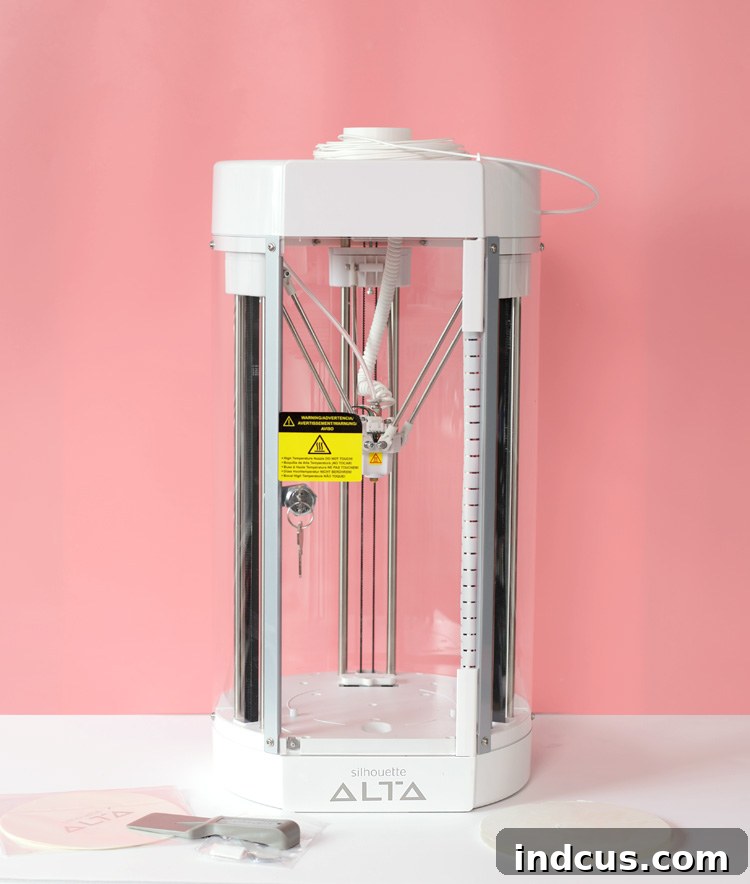
The Silhouette Alta 3D Printer is a game-changer for anyone looking to step into the world of three-dimensional crafting without the steep learning curve often associated with other 3D printers. Designed with crafters in mind, it’s remarkably intuitive, making it perfect for beginners while still offering enough versatility for more experienced users. Its compact size and vibrant design make it a welcome addition to any craft room or workspace, ready to bring your creative visions to life with surprising precision.
Whether you’re organizing your craft supplies, tidying up the pantry, categorizing toys in a playroom, or streamlining your office documents, custom label holders add a professional and cohesive touch. They not only help you find items quickly but also add a decorative element that enhances the overall look of your space. The durability of 3D printed plastic means these labels will withstand daily use far better than paper alternatives, offering a long-lasting solution for even the busiest households.
Essential Materials for Your 3D Printed Label Holders Project
Embarking on this rewarding project requires just a few key items. Fortunately, the Silhouette Alta comes equipped with most of what you’ll need to begin printing right out of the box, simplifying the setup process immensely.
- Silhouette Alta 3D Printer: This is the heart of your operation, making 3D printing accessible and enjoyable.
- 3D Printing Filament: The plastic material that your Alta transforms into your label holders.
- Gold Spray Paint (optional): For those who desire a metallic finish, this step adds a touch of elegance.
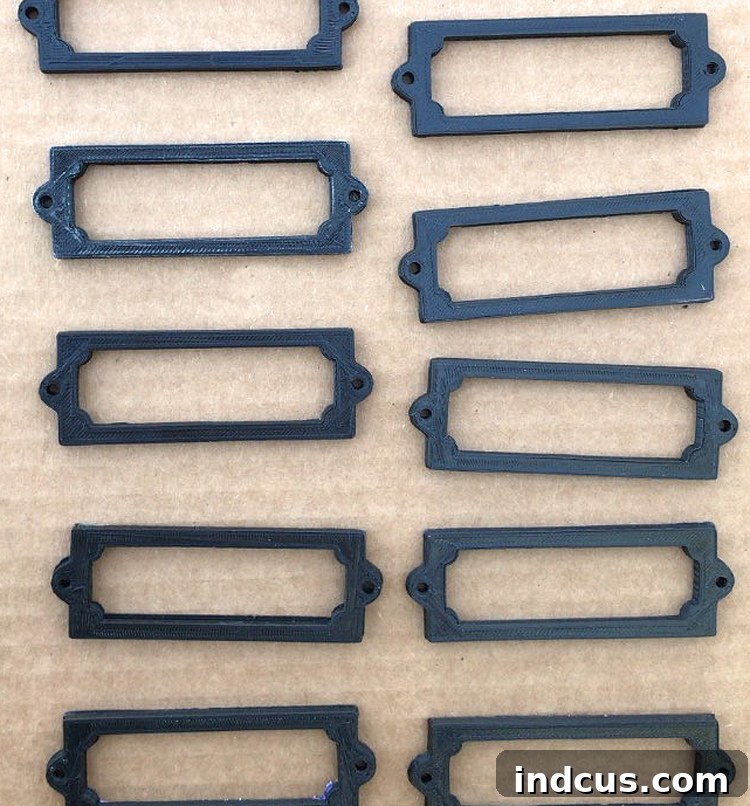
The Silhouette Alta typically includes a starter roll of filament, allowing you to begin your first project immediately. However, to truly explore the creative possibilities, you’ll likely want to invest in additional filament in various colors. For this specific project, I initially used basic black PLA filament to print the label holders. While functional, I envisioned a more sophisticated, metallic look to complement my decor. This is where the gold spray paint comes in!
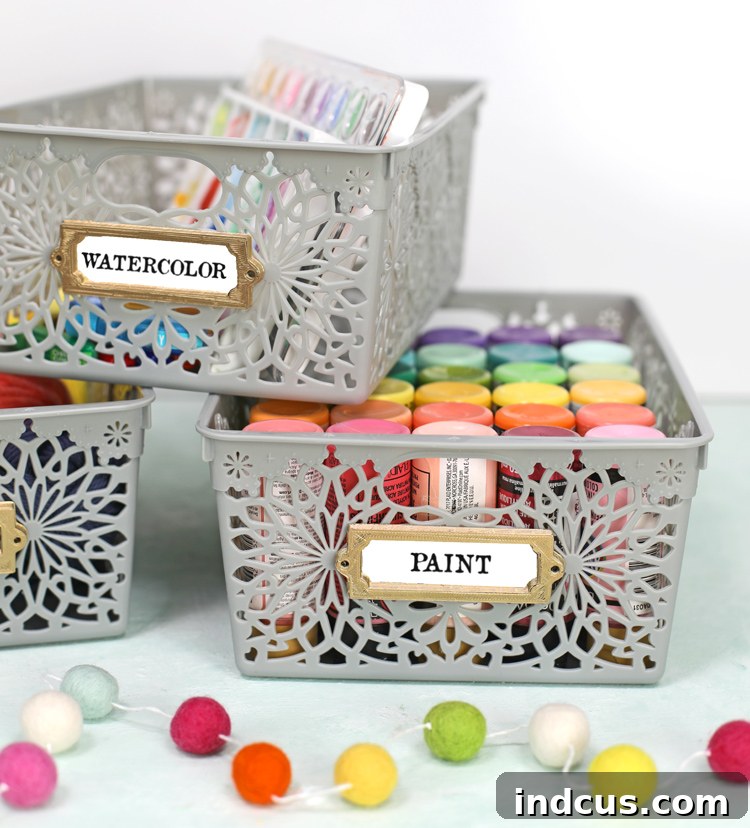
Many crafters are delighted to discover that 3D printed objects can be easily painted after printing. This opens up a world of customization options, allowing you to perfectly match your creations to any color scheme or aesthetic. Applying a few light coats of metallic gold spray paint instantly transformed my black plastic holders into elegant, metal-like accents that perfectly suited my storage bins. The transformation is truly impressive and offers incredible flexibility in your design choices.
Beyond standard colors, Silhouette America has recently expanded its range of specialty 3D filament options, pushing the boundaries of what you can create. Imagine crafting with metallic finish filaments that print with a built-in sheen, glow-in-the-dark filament for whimsical projects, or even wood-look filament for a rustic charm. These innovative materials provide endless opportunities for experimentation and unique project development. I’m incredibly excited to get my hands on some of these new filaments and discover their full potential!
Step-by-Step Instructions: Crafting Your Custom 3D Printed Label Holders
Creating these personalized label holders is a straightforward process, thanks to the intuitive design of the Silhouette Alta and its accompanying software. Follow these steps, and you’ll have beautifully organized bins in no time.
Step 1: Download and Open Your Free 3D File in Silhouette 3D Software
Your first step is to acquire the 3D design file. You can download the free file specifically designed for these label holders from the bottom of this very post. Once downloaded, navigate to the Silhouette 3D software on your computer. Inside the software, click on FILE > OPEN, and then browse to the location where you saved your downloaded file. Select the file, and it will appear on your virtual design bed, ready for customization. The file will initially appear like this:
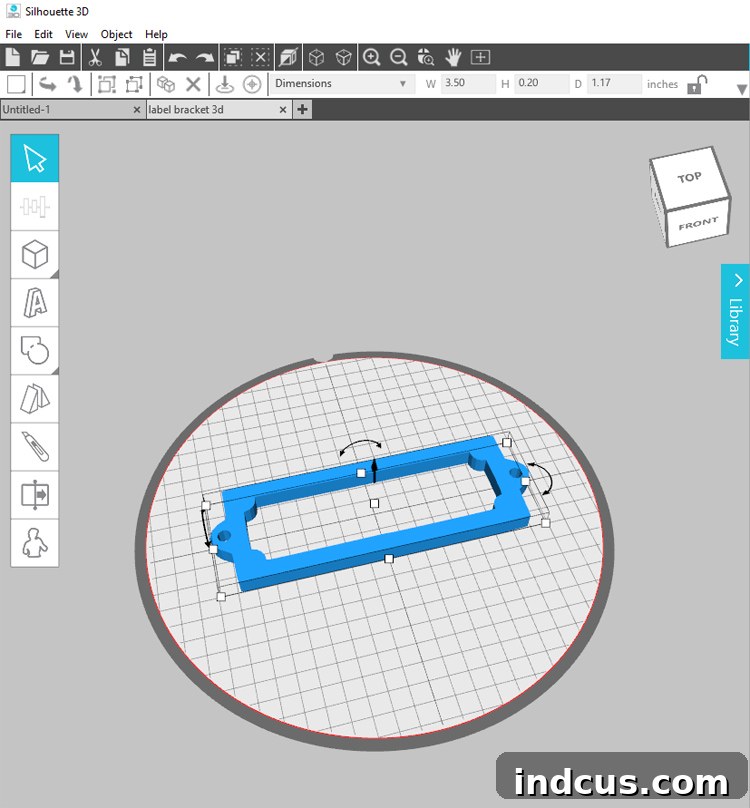
Once your label holder design is loaded, you have the flexibility to adjust its dimensions to perfectly suit your needs. Utilize the small white squares located around the design to manipulate its size, proportions, and even its thickness. For precise adjustments, you can also use the numerical input fields typically found in the software’s property panel. The helpful cube shape icon in the upper right-hand corner of the workspace allows you to easily change your viewing angle, helping you inspect your design from all perspectives before printing. Take your time to scale your label holders to fit your specific storage bins – this customization is one of the biggest advantages of 3D printing!
Step 2: Prepare Your Silhouette Alta Printer and Load Filament
With your design ready, it’s time to prepare your printer. First, ensure your Silhouette Alta machine is powered on and securely connected to your computer via the provided USB cord. A stable connection is crucial for seamless communication between your software and printer.
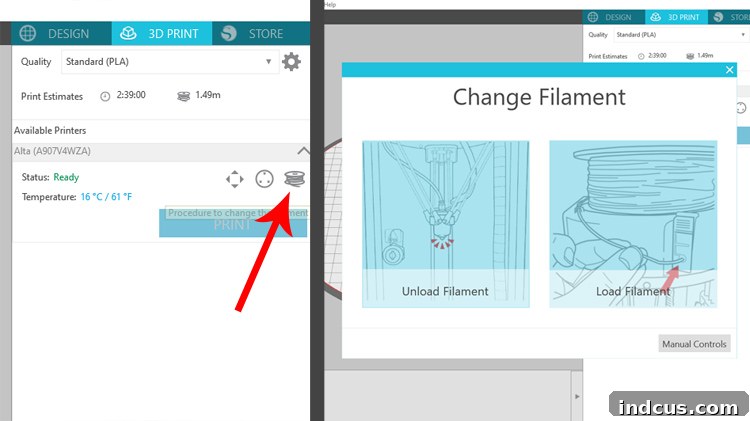
Next, you’ll load the filament – the plastic material that will be extruded to form your object. The Silhouette Alta makes this process remarkably user-friendly. In the Silhouette 3D software, locate and click on the filament icon, usually depicted as a spool of thread or a filament strand. Follow the on-screen prompts, which will guide you through heating the nozzle and feeding the filament correctly into the machine. Ensure the filament is inserted smoothly and without kinks to prevent printing errors. This is also your chance to choose the color of filament you wish to print with – remember, you can always paint it later if you want to change its appearance!
Step 3: Select Print Settings and Initiate Printing
Now that your design is finalized and your printer is ready, it’s time to send your creation to the Alta. Navigate to the 3D PRINT tab, typically located in the upper right-hand corner of the Silhouette 3D software interface. Here, you will select your desired print quality. For most everyday projects like these label holders, the STANDARD (PLA) setting offers an excellent balance of speed and detail. This setting is generally recommended for durable, functional prints that don’t require extremely fine intricate details. You may also see options for “Draft” (faster, less detail) or “Fine” (slower, more detail), depending on your software version. Once you’ve chosen your quality setting, simply click the prominent blue PRINT button to send your design to the printer and watch the magic unfold!
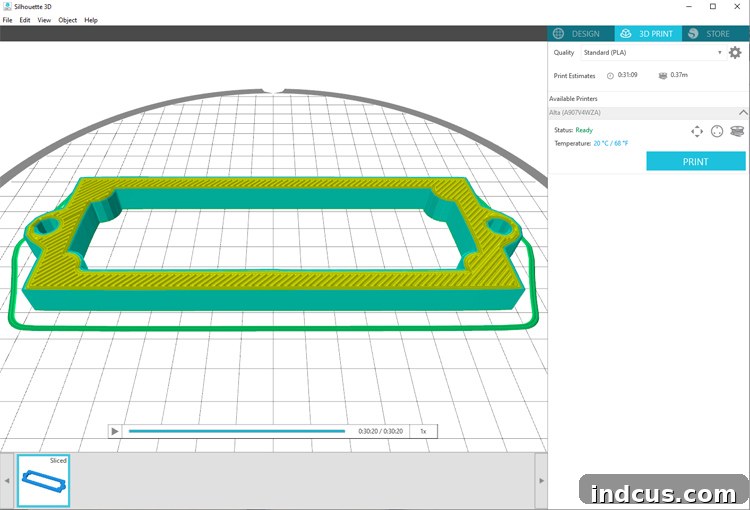
Allow your Silhouette Alta to work its wonders. Depending on the size and quantity of your label holders, the printing process can take anywhere from a few minutes to a couple of hours. During this time, the Alta will meticulously layer plastic filament to build your custom holders from the ground up. The anticipation is part of the fun!
Here’s a glimpse of what my label holders looked like immediately after they finished printing, before any additional finishing touches were applied:
Finishing Touches and Attachment
Once your label holders have cooled and been removed from the print bed, the real customization begins. If you opted for a basic filament color, now is the perfect opportunity to transform their appearance. I decided to give mine a sophisticated metallic look using gold spray paint. When spray painting, ensure you work in a well-ventilated area and apply multiple thin coats rather than one thick coat. This prevents drips and ensures an even, professional finish. Allow each coat to dry completely before applying the next.
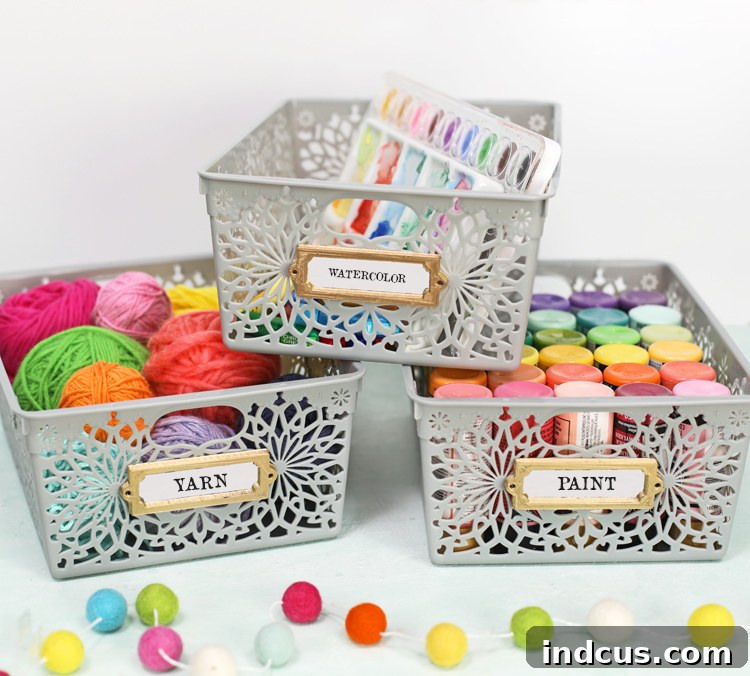
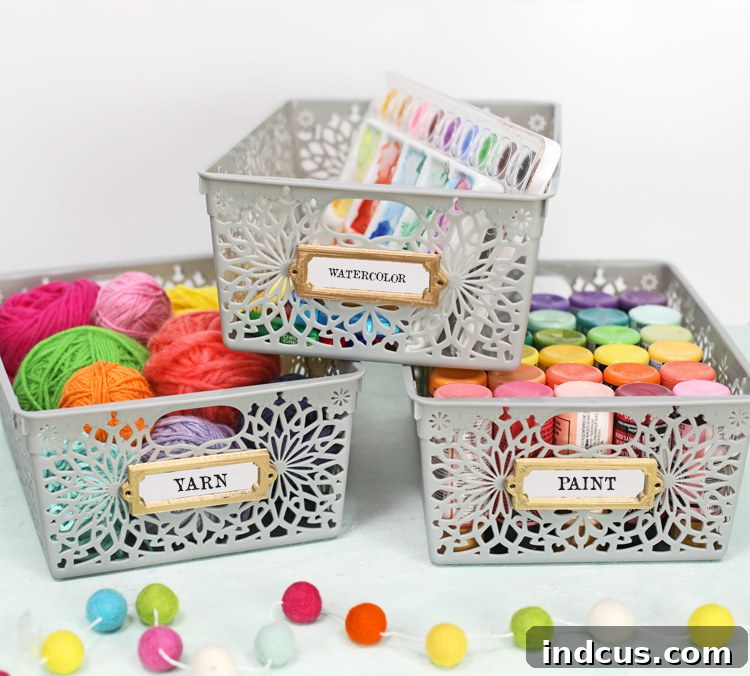
For this project, I discovered some incredibly cute and affordable plastic storage bins at a local dollar store. They were the perfect canvas for my new custom label holders. To attach the holders securely, I used a hot glue gun. I applied hot glue along the bottom edge and the two vertical sides of the back of the label holder, leaving the top edge open. This clever trick allows you to easily slide paper labels in and out, making it simple to change the contents or repurpose your bins later on.
Beyond hot glue, these versatile label holders are designed with additional attachment options. Notice the small holes featured on each side of the holders? These are intentionally included, providing a convenient way to screw the holders into place. This method is ideal for projects where a more permanent or robust attachment is desired, such as wooden crates, shelves, or heavier-duty storage containers. Consider the material of your storage bins and the intended use when deciding on your preferred attachment method.
The transformation from a raw 3D print to a polished, functional organizational tool is truly satisfying. These simple label holders add so much character and efficiency to any space. So, what do you think of the final result? Are you as impressed as I am by the capabilities of desktop 3D printing?
Embracing 3D printing for your home organization needs opens up a world of possibilities. No longer are you limited to standard sizes or finishes. You can custom-tailor every aspect, from the dimensions of your label holders to their color and attachment method. This project is just one example of how the Silhouette Alta can empower crafters to create practical, beautiful, and personalized items for their homes. Imagine printing custom drawer organizers, unique wall hooks, or even intricate decorative elements – the only limit is your imagination!
Remember, this specific design is just a starting point. Once you gain confidence with your Silhouette Alta, you might explore modifying this design slightly within the software, perhaps by adding a decorative border, changing the shape of the top opening, or even embossing a small icon. The free file provided here serves as an excellent foundation for both learning and creating.
Download the Free 3D Printing File for Label Holders Here!
We hope this guide inspires you to explore the exciting world of 3D printing with the Silhouette Alta. It’s a fantastic tool for crafters and organizers alike, offering endless opportunities to customize and create. Get ready to transform your home with personalized, 3D printed solutions!
Did you find this project helpful and inspiring? Don’t forget to save it for later! Pin it to your favorite crafting or organization board so you can easily come back to it whenever you’re ready to print your own custom label holders. Happy crafting and organizing!