Unlock Your Creativity: Crafting a Custom Monogram Luggage Tag with the Silhouette Alta 3D Printer
Embarking on the world of 3D printing is like discovering a new dimension in crafting. Imagine transforming your creative visions into tangible, three-dimensional objects right from your desktop! If you haven’t yet explored the capabilities of a 3D printer, prepare to be amazed. Devices like the Silhouette Alta 3D Printer have revolutionized how we approach DIY projects, opening up a universe of possibilities from personalized home decor to unique gifts and practical accessories.
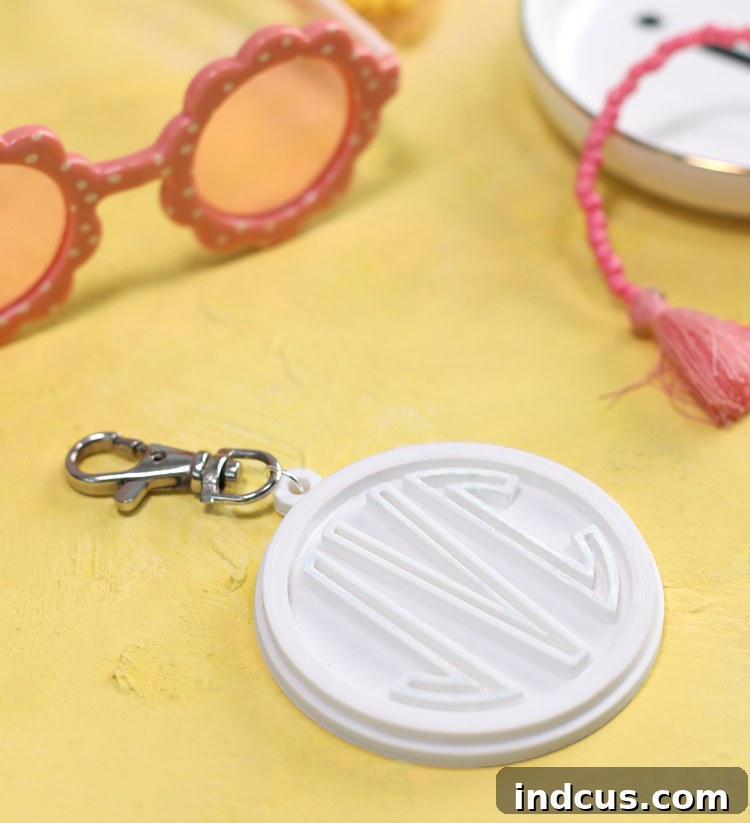
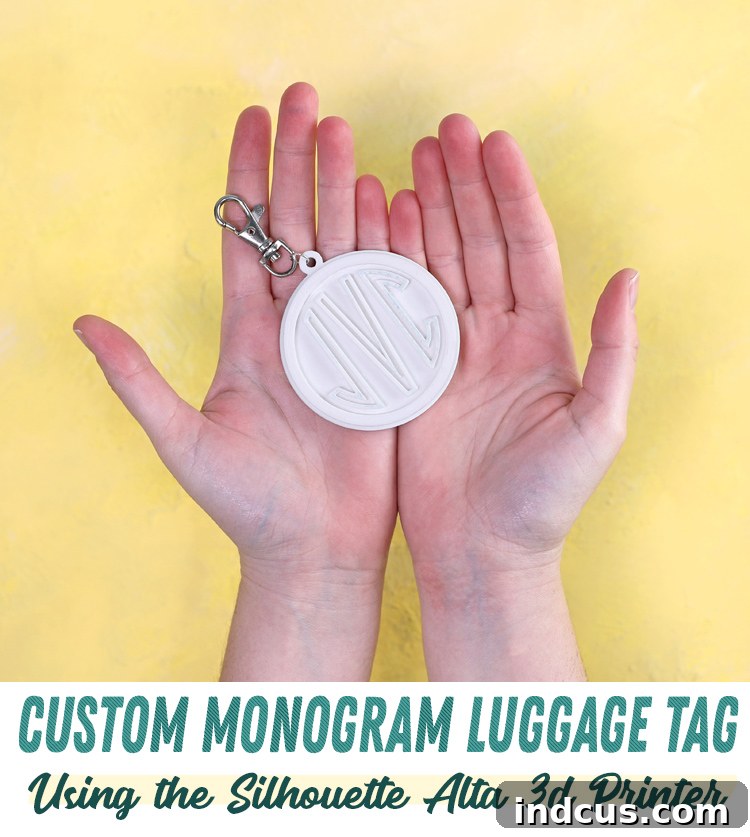
Today, we’re diving into an exciting project that beautifully showcases the power and simplicity of desktop 3D printing: creating your very own custom monogrammed luggage tag. Not only will this project add a distinctive touch to your travel gear, making your suitcase easily identifiable, but it also serves as a fantastic introduction to the intuitive design process with the Silhouette Alta.
This post is sponsored by Silhouette America. All ideas and opinions are my own.
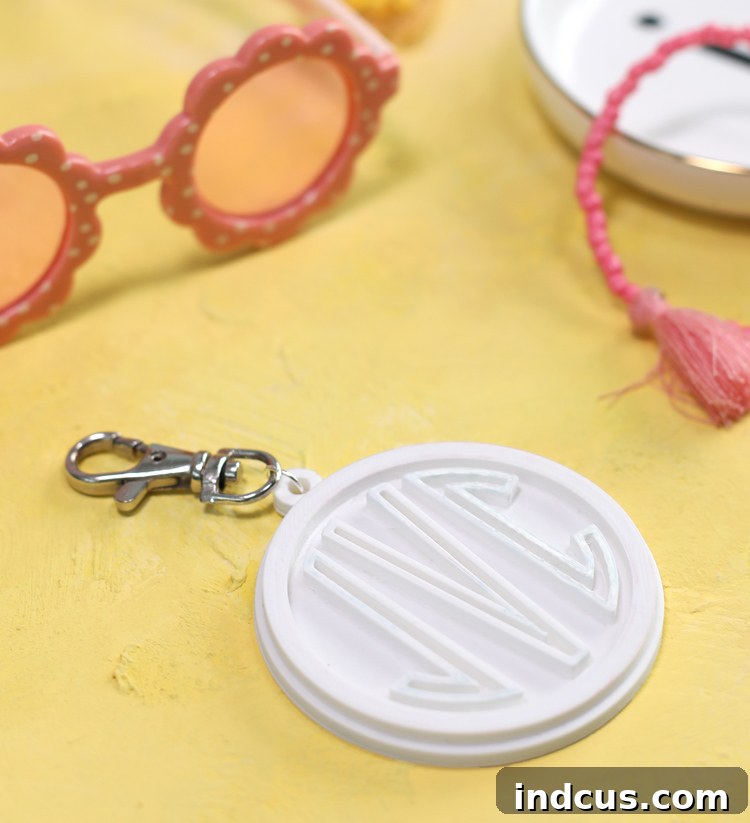
Why choose a 3D printed luggage tag? Beyond the sheer joy of creating something unique, a 3D printed tag offers unparalleled durability compared to traditional paper or plastic tags that can easily tear or get lost. With the ability to infuse your personal style through monograms, custom colors, and unique shapes, your luggage will stand out on any carousel, ensuring peace of mind during your travels. Plus, these make incredibly thoughtful and personalized gifts for the globetrotters in your life!
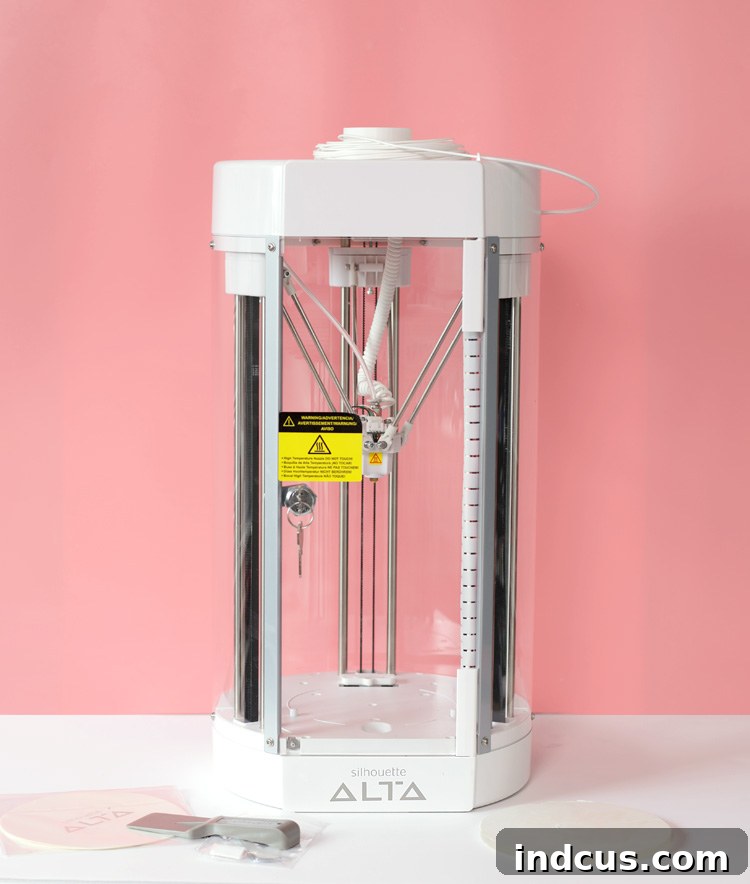
Getting Started: What You’ll Need for Your Custom Luggage Tag
The beauty of the Silhouette Alta lies in its user-friendly interface and streamlined workflow, making 3D printing accessible even for beginners. Before we jump into the design process, let’s gather all the essential materials:
Materials Needed
- Silhouette Alta or Alta+ 3D Printing Machine: The star of our show! This compact desktop 3D printer is designed for creative projects, offering simple operation and consistent results. Its ability to work seamlessly with Silhouette Studio designs makes it a crafter’s dream.
- Plastic Filament: This is the raw material that your Alta will heat and extrude to build your tag layer by layer. For luggage tags, PLA (Polylactic Acid) filament is an excellent choice. It’s biodegradable, easy to print with, and comes in a vast array of vibrant colors. Consider a strong, eye-catching color that will make your tag pop!
- Luggage Tag Silhouette File: We’ve prepared a convenient base template to get you started. This pre-designed shape saves you time and ensures your tag has the perfect dimensions and a functional loop for attachment. You can grab your Free Download HERE.
- Jump Ring and Hook (Optional): For attaching your finished luggage tag to your suitcase. A sturdy metal jump ring and a small carabiner-style hook or keyring offer a secure and professional finish.
- Ribbon or Strap (Optional): As an alternative to a metal hook, a strong piece of ribbon or a small leather strap can also be used to attach your tag, offering a different aesthetic.
- Small Pliers (Optional): Useful for opening and closing jump rings securely.
- Craft Knife or Fine-Grit Sandpaper (Optional): For minor clean-up of any rough edges after printing.
Step-by-Step Guide: Crafting Your Custom Monogram Luggage Tag
The true magic of the Silhouette Alta is its ability to transform existing Silhouette design files into 3D shapes with incredible ease. Let’s walk through the process:
Step 1: Design Your Monogram in Silhouette Studio
The first step involves personalizing your luggage tag template within the familiar Silhouette Studio software. This is where your creativity truly shines!
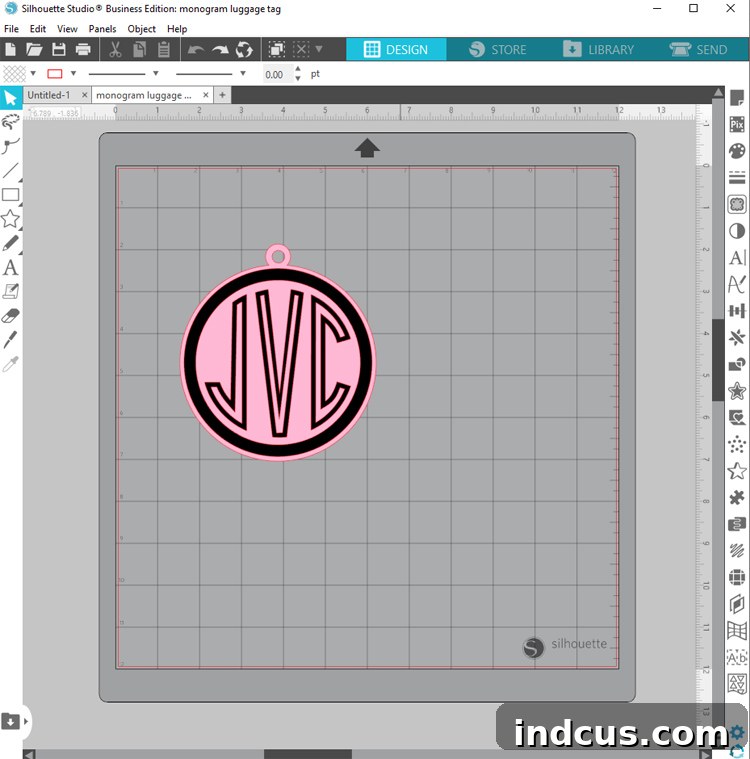
- Download and Open the Template: Begin by downloading the free luggage tag Silhouette file provided above. Once downloaded, open it directly in your Silhouette Studio software. You’ll see the basic outline of the luggage tag, complete with a hole for attachment.
- Choose Your Monogram Font: This is arguably the most exciting part! Browse through your font library or explore the Silhouette Design Store for a wide variety of monogram fonts. Consider classic interlocking styles, bold block letters, or elegant script fonts. Think about readability and how the font will translate to a 3D object. Some popular choices include three-letter monograms (first, last, middle initial) or a single prominent initial.
- Add and Arrange Your Monogram: Use the text tool in Silhouette Studio to type out your monogram. Position it centrally within the luggage tag design. Experiment with sizing to ensure it’s prominent but doesn’t extend beyond the tag’s edges. You can resize, rotate, and align your monogram to achieve the perfect look.
- Save Your Design: Once you’re happy with the placement and font of your monogram, save the file to your desktop or a designated project folder. This ensures your personalized 2D design is ready for conversion into a 3D model.
Step 2: Convert to 3D in Silhouette 3D Software
Now, let’s bring your 2D design to life!
- Launch Silhouette 3D: Open the Silhouette 3D software program, which is specifically designed to prepare your files for the Alta printer.
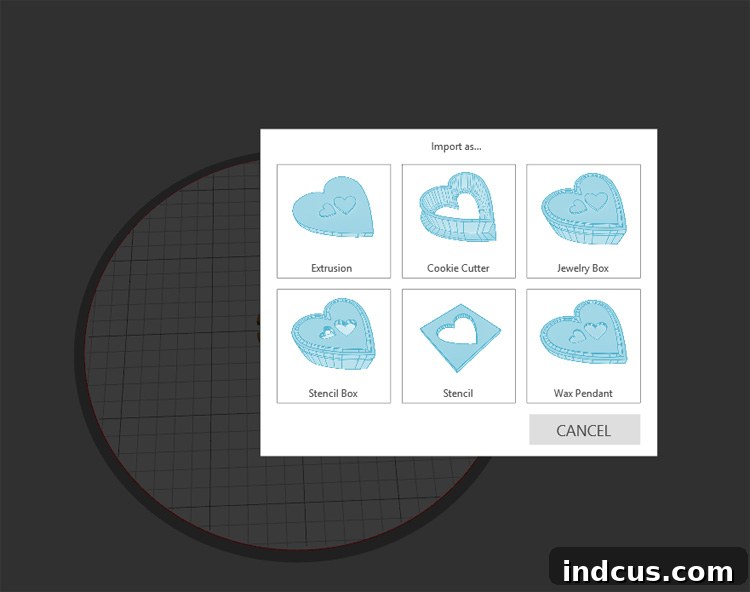
- Import Your Design: In Silhouette 3D, navigate to FILE > OPEN and locate the Silhouette Studio file you just saved. The software will process your 2D design.
- Select the Extrusion Option: Once your design appears on the screen, a dialog box will typically pop up asking you to choose a conversion method. For a project like a luggage tag, where you want to give depth to a flat shape, select the Extrusion option. Extrusion takes a 2D shape and extends it along an axis, creating a 3D object with a uniform thickness. This is the most straightforward and effective method for creating raised or debossed elements on your tag.
Step 3: Customize and Prepare for Printing
With your design now in 3D, you have powerful tools at your fingertips to refine its appearance and ensure a perfect print.
- Adjust Dimensions and Depth: In Silhouette 3D, you can precisely control the overall size of your luggage tag. You can also adjust the depth of the different parts of your design. For example, you might want the main body of the tag to be thicker for durability, while your monogram stands out with a slightly shallower or deeper extrusion. Experiment with these settings to achieve the desired visual effect and structural integrity. A good starting point for the overall tag thickness might be 3-5mm, with the monogram raised by 1-2mm.
- Review and Finalize: Take a moment to rotate your 3D model and view it from all angles. Ensure all elements are correctly positioned and that there are no gaps or unwanted overlaps. The software allows for precise adjustments, so don’t hesitate to fine-tune your design until it’s perfect.
Step 4: Sending Your Design to the Silhouette Alta 3D Printer
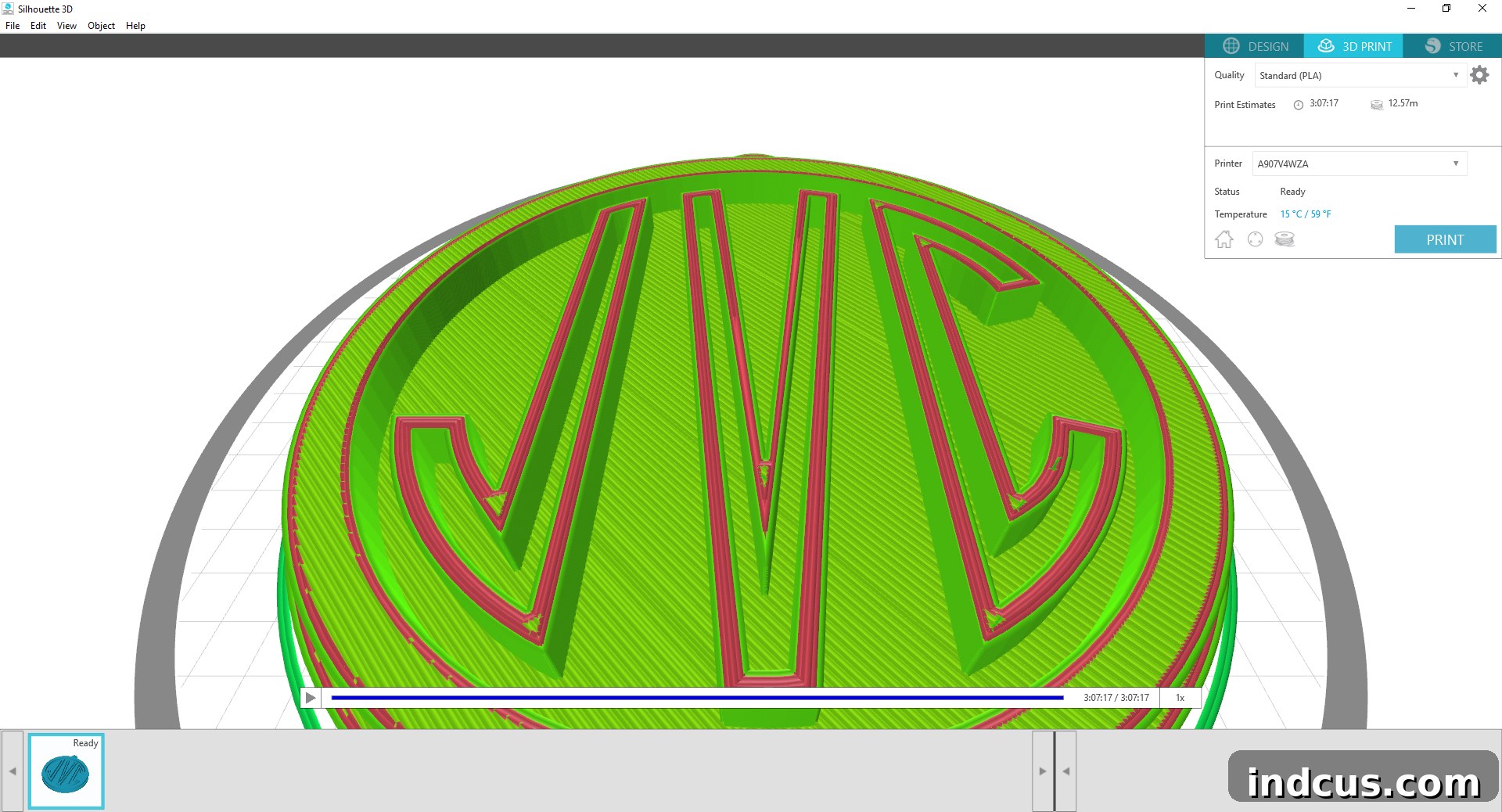
Once your design is finalized in Silhouette 3D, it’s time to send it to your Alta for printing. This stage involves setting up the print parameters to ensure a high-quality finished product.
- Configure Print Settings: Before sending the file, you’ll typically be presented with various print settings. These include:
- Resolution/Layer Height: This determines the thickness of each printed layer. A finer layer height (e.g., 0.1mm) will result in a smoother, more detailed finish but will increase print time. A coarser layer height (e.g., 0.3mm) will print faster but with more visible layers. For a luggage tag, a moderate setting often provides a good balance.
- Infill Percentage: This specifies how dense the interior of your print will be. A higher infill (e.g., 20-30%) makes the object stronger and more durable, which is desirable for a luggage tag that might endure some rough handling. A lower infill uses less filament and prints faster but results in a weaker object.
- Print Speed: Faster speeds can reduce print time but may sometimes compromise print quality, especially for intricate details.
- Supports: For this relatively flat design, you likely won’t need support structures, but it’s an important setting to be aware of for more complex prints.
- Check Print Estimates: The Silhouette 3D software will provide an estimated print time and filament usage based on your selected settings. Review these estimates to ensure they align with your expectations. Printing a luggage tag can take anywhere from 1 to 3 hours, depending on its size and your chosen settings.
- Load Filament: Ensure your Silhouette Alta is loaded with the desired color of plastic filament and that the print bed is clean and properly leveled for optimal adhesion.
- Initiate Print: With all settings confirmed, send the design to your Alta printer. The printer will begin the fascinating process of building your custom luggage tag layer by layer.
Step 5: Post-Printing and Finishing Touches
Once the printing process is complete, a few final steps will prepare your luggage tag for its first adventure.
- Remove from Print Bed: Carefully detach the finished plastic luggage tag from the Alta’s print bed. The magnetic print bed of the Alta makes this process relatively easy. Allow the print to cool slightly before removal to prevent warping.
- Clean Up (Optional): Inspect your tag for any minor imperfections, such as stray strands of filament (“stringing”) or slightly rough edges. These can usually be carefully trimmed away with a sharp craft knife or smoothed with fine-grit sandpaper for a professional finish.
- Attach Hardware: Now, add your chosen attachment hardware. If using a metal jump ring and hook, use small pliers to gently open the jump ring, thread it through the hole in your luggage tag, and then attach the hook. Securely close the jump ring. If using a ribbon, thread it through the hole and tie a secure knot, ensuring it’s strong enough to withstand travel.
Tips for Success with Your Silhouette Alta
- Keep Your Print Bed Clean: A clean print bed is crucial for good first-layer adhesion, preventing prints from detaching during the process.
- Store Filament Properly: Keep your PLA filament in a cool, dry place when not in use. Moisture can degrade filament quality, leading to poor prints.
- Experiment with Settings: Don’t be afraid to try different layer heights and infill percentages. You’ll quickly learn what works best for various projects and desired outcomes.
- Start Simple: The luggage tag is an excellent beginner project. As you gain confidence, you can explore more complex designs and multi-part prints.
- Troubleshooting: If you encounter issues like poor adhesion or clogs, consult your Alta manual or online resources. Most common 3D printing problems have simple solutions.
Beyond Luggage Tags: The Endless Possibilities of 3D Printing
Your custom monogrammed luggage tag is just the beginning! Once you master the basics with your Silhouette Alta, a whole new world of creative projects opens up. Think about:
- Personalized Keychains: Similar to luggage tags, create unique keychains for friends and family.
- Custom Ornaments: Design bespoke holiday ornaments or decorative pieces for your home.
- Organizational Tools: Print custom holders, dividers, or small trays for your craft room or office.
- Figurines and Miniatures: Explore creating small decorative figures or game pieces.
- Prototypes: If you have an idea for a small invention or gadget, you can quickly prototype it in 3D.
The ability to craft out of plastic and achieve such amazing, professional results is truly remarkable. People will hardly believe you made these items yourself!
Unleash Your Inner Innovator
The Silhouette Alta 3D Printer empowers crafters and makers to bring their digital designs into the physical world with unprecedented ease. Creating a custom monogrammed luggage tag is a fantastic way to experience this innovation firsthand, resulting in a durable, personalized accessory that’s as practical as it is stylish. So, load up your filament, fire up your Alta, and start printing your way to a more personalized and creative life!