Create a Dazzling “Mermaid in the USA” Fourth of July Shirt with Layered Heat Transfer Vinyl (Free SVG!)
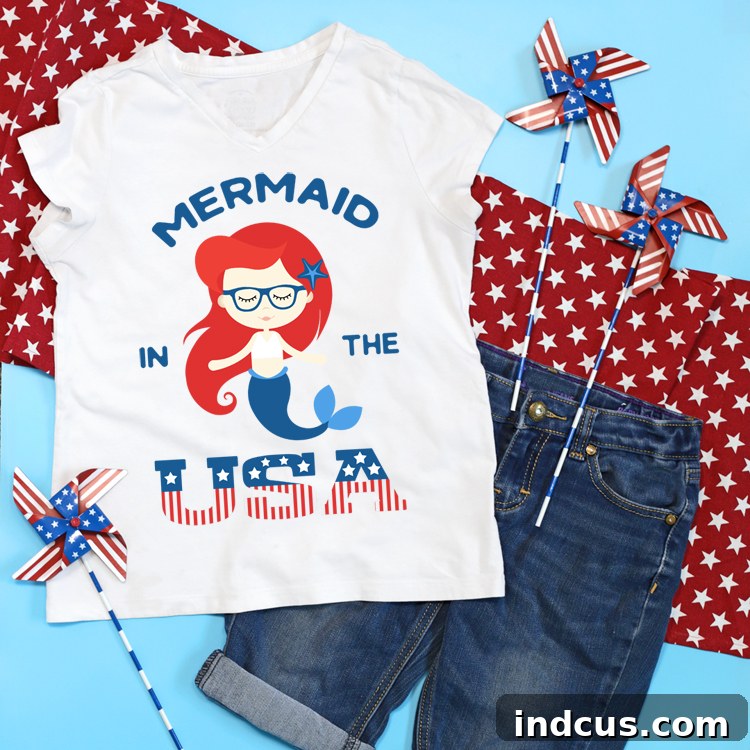
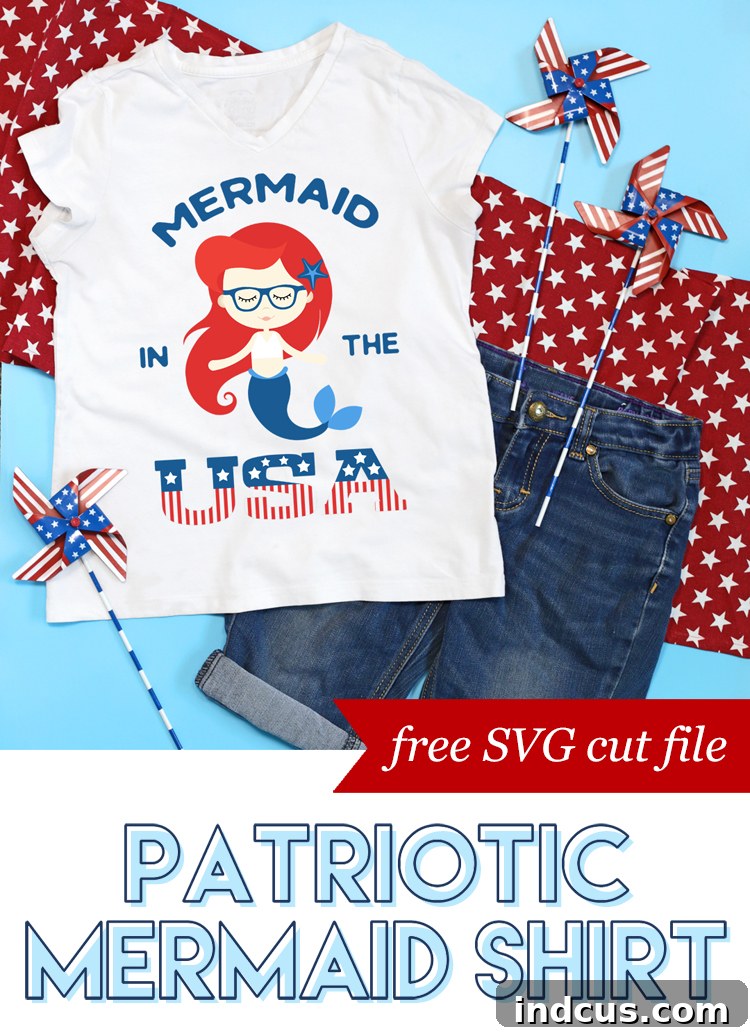
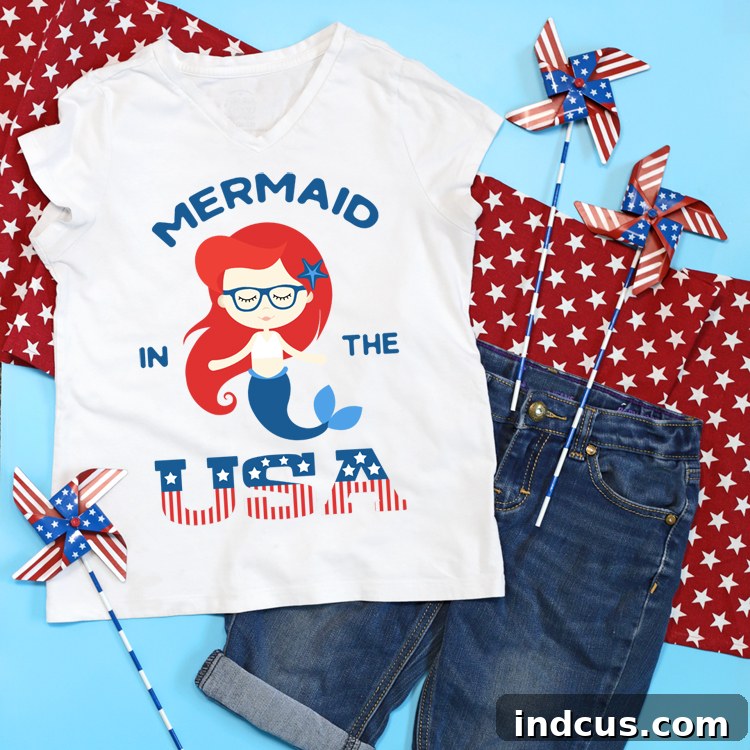
Embrace the spirit of summer and patriotism by crafting a unique “Mermaid in the USA” shirt, perfect for your little one’s Fourth of July celebrations! This comprehensive guide will walk you through the exciting process of layering heat transfer vinyl (HTV) to create a vibrant, custom design. We’re also sharing a completely free SVG cut file, making it easier than ever for you to recreate this enchanting mermaid-themed patriotic shirt. Whether you’re a seasoned crafter or new to the world of vinyl, our step-by-step instructions ensure a smooth and enjoyable crafting experience, resulting in a personalized garment that will surely be a highlight of any Independence Day festivity.
Why Choose a Custom Fourth of July Shirt?
The Fourth of July is a time for celebration, fireworks, and showing off your patriotic spirit. What better way to do this than with a unique, handmade shirt? Customizing apparel not only allows you to express individuality but also creates cherished memories. For children, wearing a shirt designed specifically for them adds an extra layer of excitement to the holiday. This “Mermaid in the USA” theme perfectly blends whimsical fun with national pride, making it an instant favorite for any mermaid enthusiast. DIY projects like this allow for complete creative control, ensuring your child stands out with a truly one-of-a-kind garment that can’t be found in stores.
Essential Materials You’ll Need
Before diving into your crafting adventure, gather the following supplies. Having everything prepared will make the process much more efficient and enjoyable:
- Plain White T-Shirt: Opt for a good quality 100% cotton or a cotton/polyester blend t-shirt. Cotton provides excellent adhesion for HTV, while blends can offer a softer feel and slight stretch. Pre-wash your shirt without fabric softener to ensure optimal vinyl adhesion and to prevent any future shrinkage from distorting your design.
- Cutting Machine: A Silhouette Cameo or Cricut machine (Explore Air, Maker, Joy) is essential for cutting the intricate design. The provided SVG file is universally compatible with most electronic cutting machines that support SVG file formats. These machines offer incredible precision, making complex layering designs achievable for crafters of all skill levels.
- Heat Transfer Vinyl (HTV): The magic ingredient! HTV comes in various colors, finishes, and textures (e.g., standard, glitter, holographic). For this project, you’ll need multiple colors for the layered effect. We recommend using high-quality HTV from a reputable supplier like Expressions Vinyl for best results, as quality vinyl often weeds and adheres more smoothly.
- Heat Press or Clothing Iron: A heat press offers consistent temperature and pressure, which is ideal for HTV application, especially for larger projects or commercial use. If you don’t have a heat press, a standard household iron can absolutely work! Just ensure it reaches a high temperature (cotton setting, no steam) and you apply even, firm pressure across the entire design.
- Weeding Tools: A weeding hook or tweezers will be invaluable for removing excess vinyl. These specialized tools make the intricate process of weeding much simpler and more precise.
- Teflon Sheet or Parchment Paper: To protect your HTV and heat press/iron during the application process, especially when layering. This prevents the vinyl from melting onto your heat source and ensures a smooth finish.
Selecting Your Heat Transfer Vinyl Colors
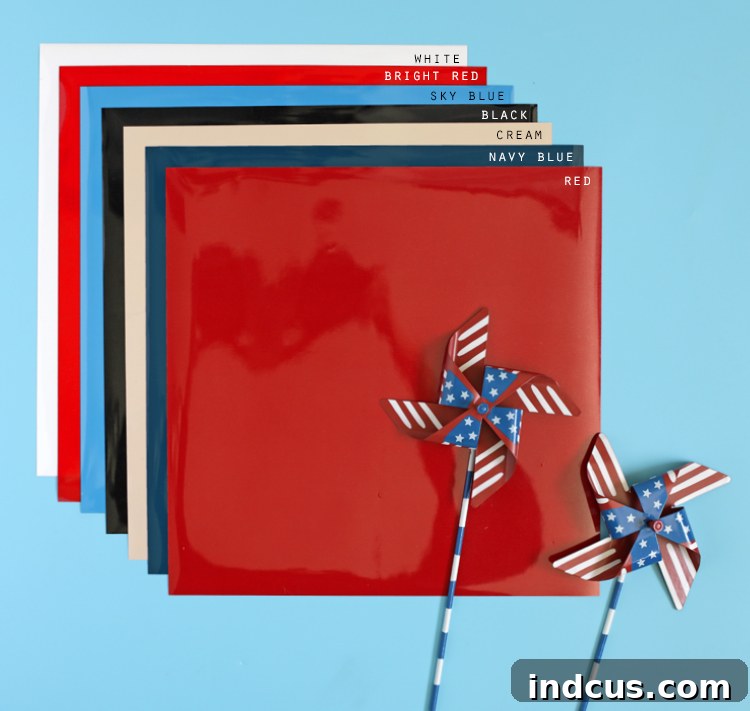
For our patriotic mermaid design, we chose a vibrant palette to truly bring the character to life with classic Americana colors. The beauty of crafting is the freedom to personalize, so feel free to adapt these suggestions to your preference or what you have on hand. This project is fantastic for using up those smaller vinyl scraps you might have collected from previous projects, making it not only fun but also economical!
- White: Perfect for the mermaid’s swimsuit top, adding a clean, classic touch that stands out against the darker colors.
- Bright Red: Used for the mermaid’s charming bangs, making them pop with a cheerful, patriotic flair.
- Sky Blue: Ideal for her elegant fins, evoking a sense of the ocean and contributing to the traditional red, white, and blue theme.
- Black: For the expressive eyes and nose, giving definition and character to her face.
- Cream or Tan: For the mermaid’s body, providing a natural skin tone base that works well with the bright colors.
- Navy Blue or Royal Blue: Used for the prominent “Mermaid in the USA” lettering and the main part of her tail, establishing a strong patriotic element.
- Dark Red: For her flowing hair, adding depth and richness that complements the bright red bangs.
- Light Pink: A delicate touch for her lips, bringing a subtle detail to her cheerful expression.
Remember, these are merely guidelines. Experiment with glitter HTV, metallic finishes, or even patterned vinyl to give your mermaid a truly unique flair that reflects your personal style. The possibilities are endless when it comes to custom designs!
Step-by-Step Guide to Crafting Your Mermaid Shirt
Step 1: Download and Prepare Your SVG Cut File
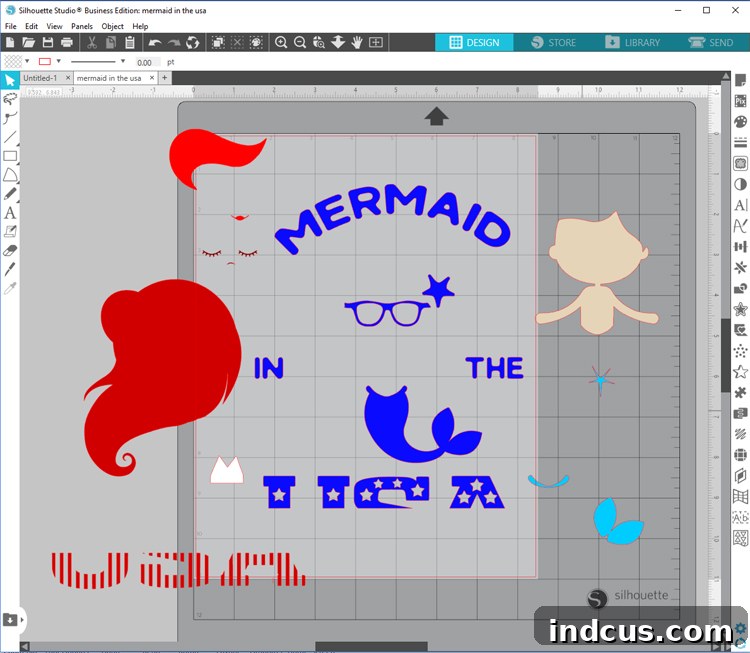
Your crafting journey begins with the design file. Locate the free SVG cut file download button at the bottom of this article. Once downloaded, open your preferred cutting machine software, such as Silhouette Studio or Cricut Design Space. SVG files are vector graphics, meaning they can be scaled to any size without losing quality, which is perfect for custom apparel.
- Import the File: Navigate to where you saved the SVG file on your computer and import it into your design software.
- Adjust Size: Measure your t-shirt (or the intended wearer’s chest/torso area) to determine the ideal size for your design. Resize the entire grouped image in your software to fit perfectly on the shirt. A good rule of thumb for a child’s shirt is usually between 6-8 inches wide for the main graphic, but always measure the specific garment for the best fit. Consider the placement carefully – whether it’s centered, off to the side, or higher on the chest.
- Ungroup for Layering: The provided cut file comes conveniently grouped by color, which simplifies initial handling. However, for layering, you’ll need to separate these components. Right-click on the design and select “Ungroup” (or “Detach” in Cricut Design Space). This allows you to work with each color individually. Move the separated color elements off to the side of your virtual mat, keeping only the color you’re currently cutting within the mat boundaries. This helps prevent accidental cuts and allows you to organize your workspace efficiently.
Step 2: Cutting Your Heat Transfer Vinyl
This is where your cutting machine shines! Each color of your design will need to be cut separately. Precision in this step is key for a flawless final product, as accurately cut pieces will align perfectly during the layering process.
- Load Your Vinyl: Place your first chosen color of HTV onto your cutting mat. Remember, for HTV, the shiny side (which is the clear plastic carrier sheet) should always be facing DOWN on your mat. The duller, adhesive side should be facing up towards the blade. This is crucial because the machine cuts through the vinyl layer, leaving the design on the carrier sheet.
- Select Cut Settings: In your software, choose the appropriate cut settings for “Heat Transfer Vinyl” or “Iron-On” (depending on your machine and vinyl type). Different brands and types of HTV may require slightly different settings (blade depth, force, speed). It’s always a good idea to perform a small test cut with a tiny shape (like a star or a square) in an inconspicuous corner of your vinyl if you’re unsure of your settings. This saves material and prevents frustration.
- The Golden Rule: Mirror Your Image! This step is absolutely critical and often overlooked by beginners. Because you’re applying the design from the back of the vinyl, you must “mirror” or “flip horizontally” your image in your software before sending it to the cutter. If you forget this, your text and directional elements will be reversed on your shirt, rendering the design unusable. Double-check this setting for every single layer you cut!
- Send to Cut: Load your mat into the machine and send your design to be cut. Once the machine is done, carefully unload the mat. Repeat this process for each color until all elements of your mermaid design are perfectly cut and ready for the next step.
Step 3: Weeding Your Vinyl Design
Once your machine has finished cutting, it’s time for the art of weeding. Weeding is the meticulous process of removing the excess vinyl that is not part of your design from the clear carrier sheet. This leaves only your desired image ready for transfer.
- Prepare for Weeding: Place your cut vinyl, still on its carrier sheet, on a flat, well-lit surface. Good lighting is essential for seeing the cut lines clearly, especially with intricate designs.
- Start Gently: Using a weeding hook, tweezers, or a craft knife, carefully peel away the large outer areas of vinyl first. Begin from a corner and slowly pull the vinyl away, making sure only the waste vinyl is removed and the design elements remain on the sticky carrier sheet.
- Focus on Details: Then, move on to the smaller inner pieces, such as the centers of letters (like ‘A’, ‘D’, or ‘O’), the inside curves of shapes, or any tiny details within the mermaid’s features. Take your time, as precise weeding ensures a clean, professional look and prevents accidental removal of design elements. If a small piece lifts, gently press it back down with your tool.
- Keep Carrier Sheet Intact: Remember, you want to leave only the desired design adhered to the clear, sticky carrier sheet. This sheet acts as a temporary transfer tape and will hold your design together during application to your t-shirt. Inspect each piece carefully before moving on.
Step 4: Layering and Applying HTV to Your Shirt
This is the exciting part where your design truly comes to life on the fabric! Layering HTV requires patience and precise alignment. The general rule for layering multiple colors of HTV is to apply from the back-most layer of your design to the front-most layer. This ensures that the primary, foundational elements are fully adhered, and subsequent layers build upon them without creating bulky or uneven surfaces.
- Pre-Press Your Shirt: Before applying any vinyl, give your t-shirt a quick 5-10 second press with your heat press or iron. This step is crucial for removing any moisture, wrinkles, and pre-shrinking the fabric slightly, creating a perfectly flat and dry surface for optimal adhesion.
- First Layer Placement: Position your first layer (which is typically the base layer or the largest element that doesn’t overlap extensively) onto your shirt. The clear carrier sheet makes positioning easy, allowing you to see through to the fabric. Ensure it’s perfectly centered and straight according to your desired placement.
- Tack Down Each Layer: For the initial layers (all but the very last one), you’ll only “tack” it down with your heat press or iron for a very short duration (e.g., 5-7 seconds). You don’t want to fully press the inner layers, as they will receive full heat again with subsequent layers. Overheating can cause vinyl to shrink, crack, lift, or even scorch the fabric. Use firm pressure.
- Peel While Warm/Cool: Most standard HTV is “hot peel,” meaning you can remove the carrier sheet while it’s still warm to the touch. Some specialty vinyls (like glitter or holographic) might be “cool peel,” so always check your vinyl manufacturer’s instructions for the specific type you are using. Peel slowly and evenly.
- Align and Repeat: Carefully align your next layer, ensuring it sits perfectly on top of or next to the previous layer. Use the clear carrier sheet as a guide, referencing the existing vinyl on the shirt. Once aligned, place your Teflon sheet over the entire design (including the previous layers) and press briefly, then peel. Continue this process until all layers are applied. For the very last layer, you will apply the full recommended press time (e.g., 15-20 seconds) to ensure all layers are fully adhered.
Here’s the specific layering order for our “Mermaid in the USA” design to guide you:
- Dark Red (Hair): This forms the base of the mermaid’s flowing hair. Position this first.
- Cream or Tan (Face and Body): Carefully align her face and body onto the hair and shirt, ensuring it fits neatly into the hair outline.
- Navy Blue or Royal Blue (Words/Tail): Position the “Mermaid in the USA” text and the main part of her tail. These are significant elements that will often sit directly on the shirt or over minimal underlying vinyl.
- All Remaining Pieces: Now, add the smaller, final details that sit on top of the larger base layers. This includes the Bright Red (bangs), Sky Blue (fins), Black (eyes and nose), White (swimsuit top), and Light Pink (lips). These smaller details are usually applied last to create the intricate finishing touches of the design.
To further illustrate the layering process and provide a visual guide, here’s a helpful video demonstrating the correct order and technique for applying each layer of vinyl. Watching it can clarify any uncertainties you might have and show you exactly how each piece should be positioned and pressed for a professional finish!
[Please imagine a helpful video demonstrating HTV layering techniques here.]
Tips for Perfect HTV Application and Care
- Temperature and Pressure: Consistency is key to successful HTV application. Always refer to your HTV manufacturer’s recommended temperature and press time. If using an iron, apply firm, even pressure over each section for the recommended duration, ensuring every part of the design receives adequate heat.
- Use a Teflon Sheet: Always place a Teflon sheet or parchment paper over your design, especially when layering. This protects the vinyl from direct heat, prevents it from sticking to your heat source, and ensures a smooth, even finish across all layers.
- Prevent Scorching: If using a household iron, keep it moving slightly in a circular motion (while maintaining pressure) to prevent scorching the fabric or vinyl. Avoid leaving the iron in one spot for too long.
- Quality Check: After peeling the carrier sheet, gently lift the edges of your vinyl with your weeding tool. If any part isn’t fully adhered and starts to lift, place the Teflon sheet back over it and press for another few seconds until it’s secure.
Caring for Your Custom HTV Shirt
To ensure your beautiful “Mermaid in the USA” shirt lasts for many Independence Days to come, keeping its vibrant colors and crisp design, follow these simple care instructions:
- Wait 24 Hours: Allow the vinyl adhesive to fully cure for at least 24 hours (preferably 48-72 hours) after application before the first wash. This is critical for preventing the vinyl from peeling prematurely.
- Wash Inside Out: Always turn the shirt inside out before washing. This protects the vinyl design from friction with other garments and the harsh tumbling action of the washing machine.
- Cold Water, Gentle Cycle: Wash in cold water on a gentle cycle with a mild detergent. Hot water and harsh detergents can weaken the vinyl’s adhesive.
- No Fabric Softener: Avoid using fabric softener. It can break down the adhesive properties of the HTV, leading to peeling and cracking over time.
- Hang Dry or Low Tumble Dry: For the best results and longevity of your design, hang dry the shirt. If you must use a dryer, tumble dry on a low heat setting and still keep it inside out. High heat is the enemy of HTV and can cause it to shrink, crack, or melt.
- Do Not Iron Directly on Design: If ironing is necessary for wrinkles on the fabric, turn the shirt inside out or place a thin cloth (like a cotton tea towel) over the vinyl design before applying heat.
Your Finished Patriotic Creation!
Layering heat transfer vinyl might seem intricate at first, but with a little patience, attention to detail, and adherence to these guidelines, you’ll master it in no time. The finished shirt is not just a piece of clothing; it’s a testament to your creativity, a labor of love, and a joyful expression of patriotism. We’re so excited for your daughter (or anyone who wears it!) to proudly sport this fun “Mermaid in the USA” shirt on the Fourth of July, making memories that will last a lifetime.
Don’t forget to grab your free SVG file below and start crafting today. We can’t wait to see your unique creations and how you celebrate Independence Day with your personalized apparel!