
Elevate Your Holiday Decor: Craft Exquisite Miniature Foiled Christmas Houses with Foil Quill & Silhouette Cameo (Free SVG Files Included!)

The magic of the holiday season often finds its most heartfelt expression in handmade decorations. There’s a unique joy in crafting something beautiful that adds a personal touch to your festive home. If you’re looking to infuse your holiday decor with elegance and a dazzling metallic shimmer, you’ve come to the right place. Today, we’re diving into the exciting world of digital crafting to create enchanting miniature paper Christmas houses, adorned with intricate gold foil designs.
I’ve been eagerly awaiting the opportunity to experiment with the innovative Foil Quill since its announcement. This remarkable tool seamlessly integrates with popular electronic cutting machines like Silhouette, Cricut, Brother, and Sizzix, allowing you to impart stunning, detailed metallic foil accents onto virtually any material your machine can cut. The possibilities for creative expression are truly endless!
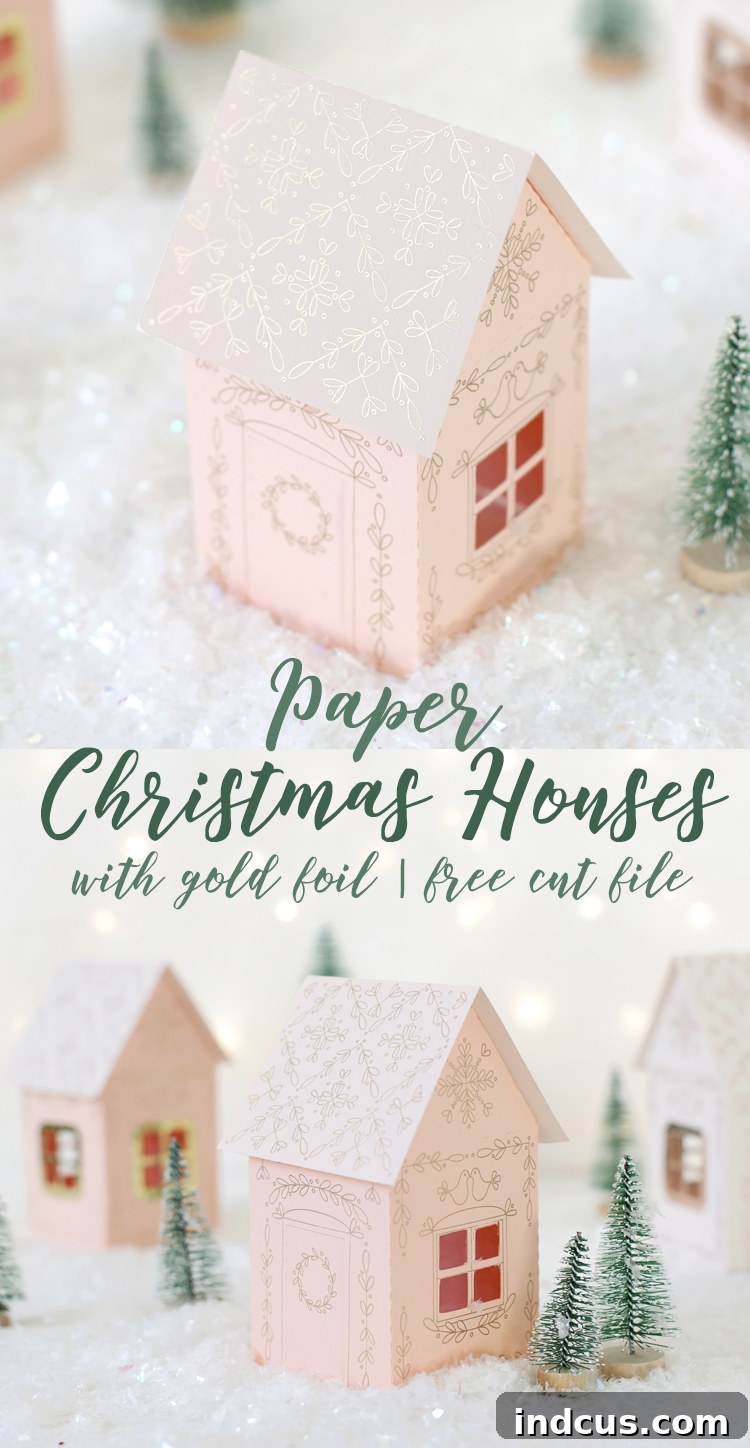
For my inaugural Foil Quill project, I decided to craft these absolutely breathtaking miniature paper Christmas houses, each featuring delicate and intricate metallic foil patterns. The results are nothing short of spectacular, and I’m thrilled to share a comprehensive, step-by-step tutorial so you can easily replicate this festive village in your own home.
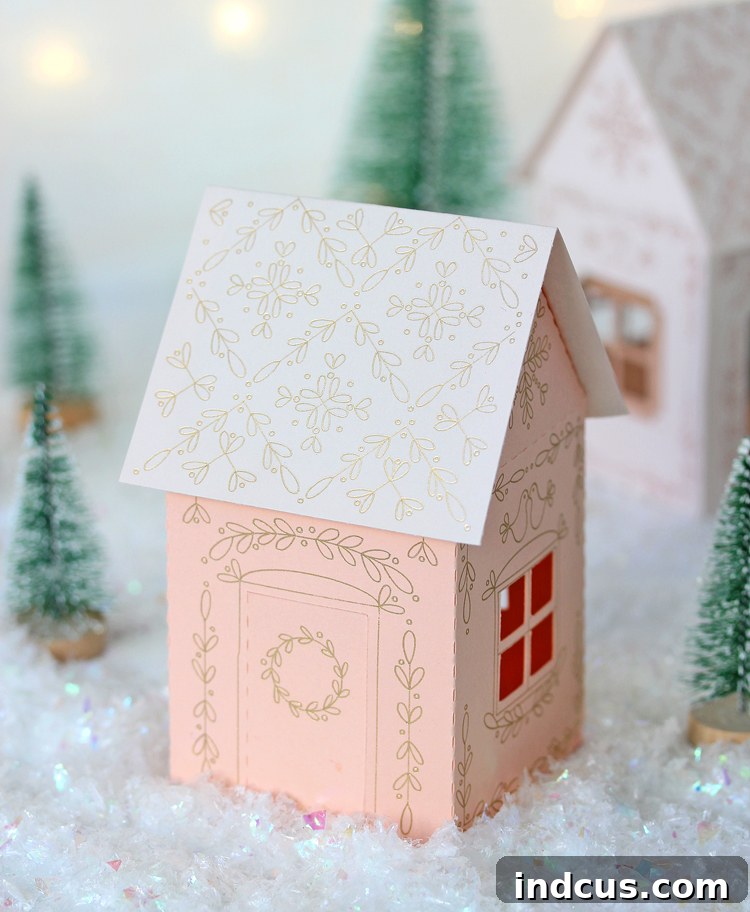
The gorgeous gold accents achieved with the Foil Quill are truly impressive. The lines are incredibly crisp, precise, and boast a brilliant metallic sheen that catches the light beautifully. If you have a moment, I highly recommend checking out the accompanying video tutorial (linked below) to truly appreciate the mesmerizing sparkle and detail. It’s hard to capture the full beauty in still images!
My lifelong fascination with all things miniature has always made creating a charming little Christmas village a high priority on my holiday crafting list. With the Foil Quill in hand, I dedicated hours to meticulously designing something that truly captures the spirit of the season. These houses are embellished with an elegant leaf and berry motif, providing a classic yet intricate feel. I’m genuinely delighted with their overall aesthetic and know they will bring warmth and cheer to any festive display.
Thanks to my wonderful sponsors at American Crafts, I’m excited to offer the essential SVG cut files for this project at no cost. You’ll find the download link conveniently located at the bottom of this post. My hope is that you’ll enjoy crafting these miniature masterpieces as much as I did and cherish them as a beautiful addition to your holiday traditions.
Ready to embark on this magical crafting journey? Let’s gather our supplies and begin creating your very own sparkling paper Christmas village!
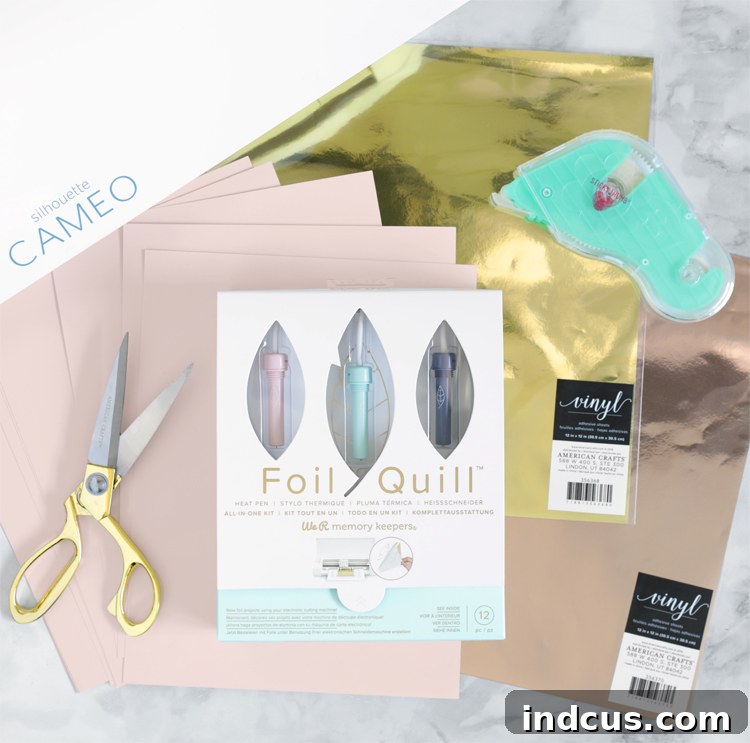
Essential Materials & Tools for Your Foiled Christmas Village
Before diving into the detailed steps, ensure you have all the necessary materials and tools at hand. Having everything organized will make your crafting process smooth and enjoyable:
- Foil Quill Starter Kit: This comprehensive kit contains the essential pens, foil, and adapters needed for this project.
- Smooth Cardstock: Opt for smooth, high-quality cardstock in your desired colors. I used a charming mix of white, blush, and a peachy pink, which beautifully complements the gold foil. The smooth surface is crucial for achieving crisp foil transfer.
- Metallic Vinyl: A small amount of metallic vinyl will be used to add elegant trim around the windows and doors, enhancing the houses with an extra touch of shine.
- Silhouette Cameo Cutting Machine: While other cutting machines are compatible with the Foil Quill, these instructions are specifically tailored for the Silhouette Cameo. Ensure your machine is in good working order.
- Scissors: For general cutting and trimming of foil and paper.
- Adhesive: A reliable adhesive is key for assembling your houses. A tape runner or a fine-tip glue pen works exceptionally well for precision and clean application.
Step-by-Step Guide: Crafting Your Foiled Christmas Houses
Follow these instructions carefully to ensure a successful and beautiful outcome. Precision in each step will yield the best results.
Step 1: Prepare Your Digital Design in Silhouette Studio
Begin by downloading the free SVG cut file from the link at the very bottom of this post (you’ll typically enter your email in the provided box to access it). Once downloaded, open the file within Silhouette Studio. The design includes three distinct components: the main body of the house, the roof piece, and the decorative trim pieces intended for the doors and windows. Carefully separate these parts and move any elements you aren’t currently working with off the digital cutting mat to avoid confusion.
A Critical Note on Colors: Do not alter the colors of the lines in the file. It is absolutely essential that the intricate foil designs are rendered in black lines, while the outer cutting shapes are defined by red lines. This color coding is how your Silhouette machine intelligently distinguishes between the parts to be foiled by the Foil Quill and the parts to be cut by the blade.
Step 2: Unpack and Identify Your Foil Quill Kit Components
Open your new Foil Quill Starter Kit. Inside, you will find:
- Three Foil Quill Pens: These come with fine, bold, and standard tips, offering versatility for different design styles.
- Three Rolls of Foil: Each roll measures 6 inches by 54 inches and includes beautiful silver, gold, and copper options.
- Four Adapters: These ensure compatibility with Silhouette, Brother, Cricut, and Sizzix machines.
- One Roll of Placement Tape: Specifically designed to hold your foil securely during the process.
- One Heat Shield: An important safety component to protect your workspace.
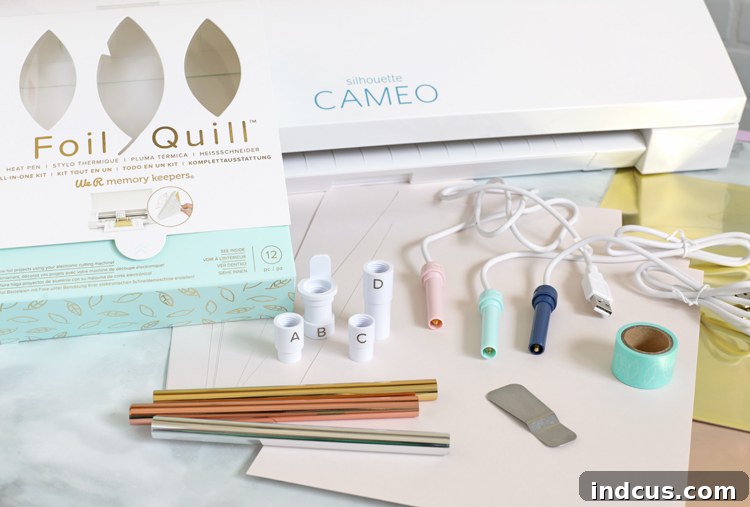
For this particular project, we will be utilizing the pink fine tip Foil Quill pen. Locate the Silhouette adapter, which is clearly labeled with the letter ‘A’. Securely screw this adapter onto your chosen Foil Quill pen. Next, carefully insert the assembled pen into the second (right-hand) spot within your Silhouette machine’s tool carriage. Simultaneously, ensure that your standard Silhouette cutting blade is correctly loaded into the left-hand spot. This dual setup allows for seamless transition between foiling and cutting.
Step 3: Prepare and Heat Your Foil Quill Pen
Before proceeding, place the included heat shield underneath the tip of the Foil Quill pen. This acts as a protective barrier for your machine and mat. Plug the Foil Quill pen into a power source (a USB port or a wall adapter, such as one from your phone charger, works well). Allow the pen to heat up for a full five minutes prior to use. This ensures the tip reaches the optimal temperature for effective foil transfer.
Step 4: Position Your Cardstock on the Cutting Mat
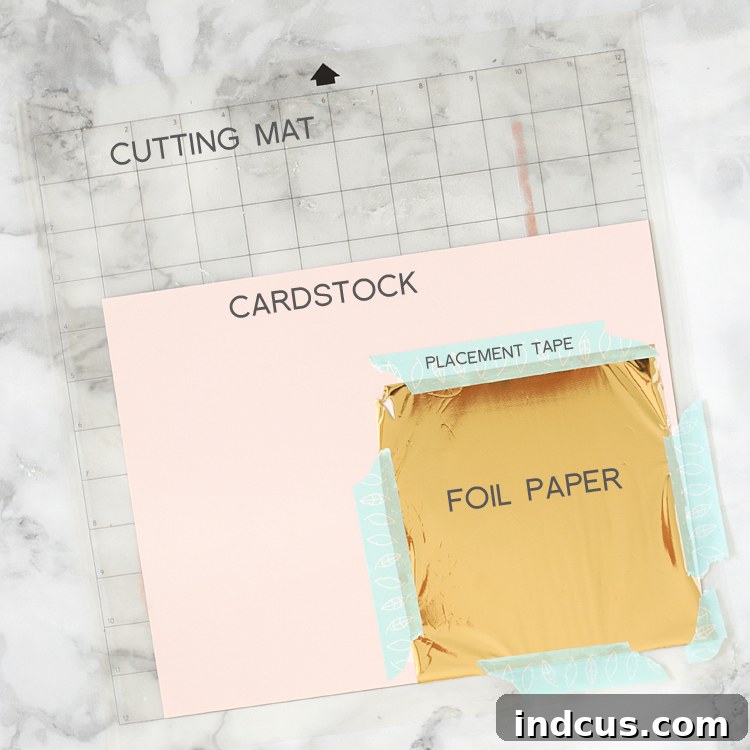
Carefully place a piece of your chosen smooth cardstock onto a standard Silhouette 12×12 inch cutting mat. Ensure it lies flat and adheres well to the mat’s adhesive surface.
Pro Tip: For easier handling and better visibility once loaded into the machine, position your cardstock at the very bottom edge of the cutting mat.
Step 5: Apply the Foil Over Your Cardstock
Select a piece of metallic foil (gold, in this case) that is slightly larger than the design you intend to foil. Carefully lay this foil on top of your cardstock, ensuring it completely covers the area where your design will be transferred. Use the placement tape provided in your Foil Quill kit to secure the foil around its edges, adhering it firmly to the cutting mat. Once secured, load the mat into your Silhouette Cameo.
Pro Tip: It is crucial that the foil completely covers all areas where the design will be foiled. Any overlap of the tape onto the design area will prevent the foil from transferring correctly in those spots, resulting in an incomplete design.
Step 6: Configure Silhouette Studio Cut Settings
This is a pivotal step, so pay close attention to the settings. In Silhouette Studio, navigate to the “SEND” panel, then select “LINES.” Here, you will assign actions to your two tools based on their respective line colors:
- Ensure the left tool (which corresponds to the red lines, your cutting blade) is set to “Cut.”
- Confirm the right tool (which corresponds to the black lines, your Foil Quill pen) is set to “Sketch.”
It’s important to dictate the order of operations. Drag and drop the actions in the queue so that the black lines (foiling) are processed first. Then, add a pause between the foiling and cutting actions. You can do this by right-clicking on the black square representing the foiling action and choosing “add a pause.” This pause is essential because you will need to manually remove the foil sheet after the foiling is complete, but *before* the cutting action begins.
I understand this section can be a bit intricate, especially if you’re new to the “Sketch” feature. When all settings are correctly configured, your “SEND” panel should visually align with the example image provided below, showing the sketch action first, followed by a pause, and then the cut action.
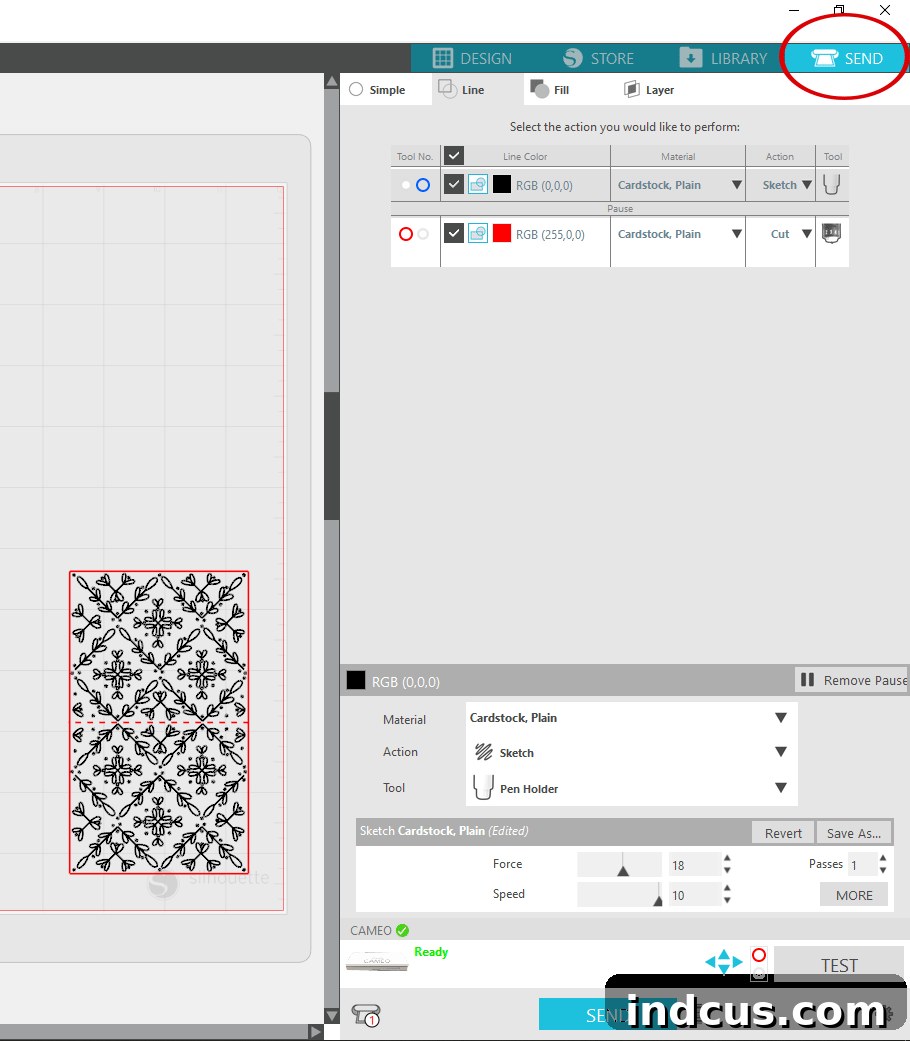
Take a moment to meticulously double-check that all your settings are precisely as described. Once confirmed, confidently hit the “SEND” button to initiate the process.
Step 7: The Foiling Process & Crucial Mat Reload
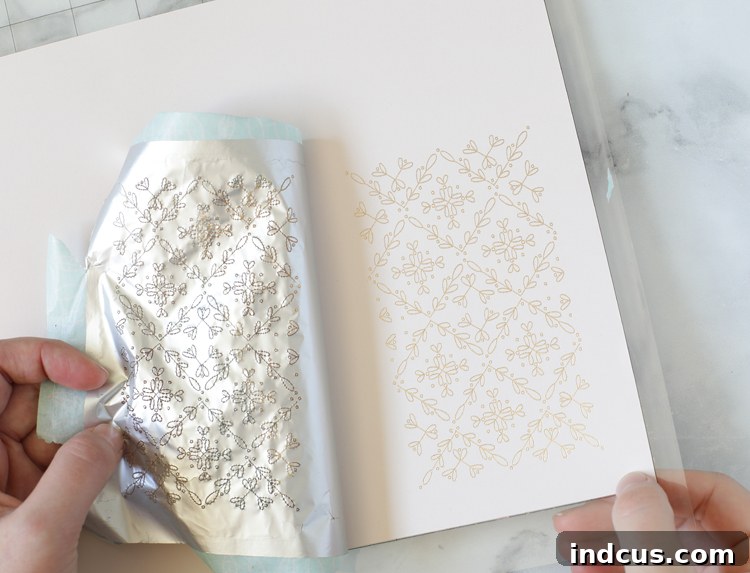
At this stage, your Silhouette machine will instruct the Foil Quill pen to begin sketching the intricate designs onto the foil. The process is remarkably similar to how a sketch pen operates, but with a magical difference: the heated tip of the Foil Quill pen permanently adheres the metallic foil to the cardstock underneath, creating those crisp, shimmering lines.
Once the foiling is complete and the machine has worked its magic, your Silhouette will automatically pause, and the Foil Quill pen will lift from the surface. At this exact moment, carefully unload the cutting mat from your machine. Immediately after, without adjusting the mat’s position, hit “RELOAD,” ensuring the mat is re-inserted and aligned in precisely the same way it was before. This step is absolutely paramount! If the mat is reloaded even slightly off-kilter, your subsequent cuts will not align with your freshly foiled designs, leading to a frustratingly misaligned project. While it may not result in a thousand tears, it will certainly be a disappointment!
Step 8: Remove the Foil Sheet
With the mat precisely reloaded, carefully peel away the entire foil sheet and any placement tape from over the cardstock. You will now see your beautifully foiled design permanently etched onto the paper, ready for cutting.
Step 9: Initiate the Cutting Action
Return to Silhouette Studio and click “RESUME.” The machine will now engage the left tool (your cutting blade) to precisely cut out the main house shape from the cardstock, following the red lines you defined earlier.
Step 10: Repeat for the Roof Piece
To maintain consistency and ensure all parts of your village sparkle, repeat the entire foiling and cutting process for the roof piece. This involves re-setting the foil, configuring the software, and executing the steps as outlined above.
Step 11: Add Metallic Vinyl Trim for Extra Sparkle
To further enhance the visual appeal and add an extra layer of metallic interest, I chose to frame the windows and doors of these houses with metallic vinyl. For this, I used an adhesive vinyl from American Crafts, which I found in the open stock paper section. Its super-shiny finish provides a delightful pop against the foiled cardstock. Simply cut the trim pieces using your cutting machine as you would with any vinyl, weed away the excess material, and then carefully apply them to your cardstock houses. No transfer tape is needed for these small, intricate pieces – they adhere perfectly by hand!
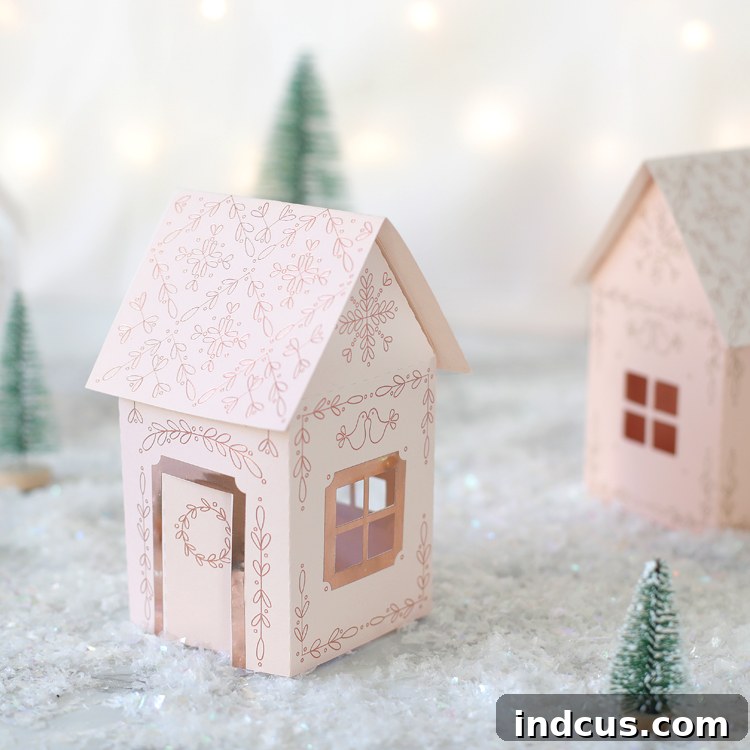
For those who enjoy variety, I also created an alternative version of the houses that includes more detailed line work around the doors and windows. Both design variations are thoughtfully included in the comprehensive download folder, allowing you to choose your preferred style or mix and match for a diverse village.
Step 12: Assemble Your Miniature Christmas Houses
With all your pieces foiled and cut, it’s time for assembly. Carefully fold along all the dotted lines on the main body of the house. Apply a thin, even layer of adhesive to each of the small flaps. Gently press the house together, ensuring all seams are aligned and firmly secured. Finally, attach the roof piece, completing the structure of your charming miniature dwelling.
Once assembled, I love placing small electric tea lights inside my paper village. The soft glow emanating from the windows truly brings these houses to life, adding an enchanting warmth to my holiday display. I’m incredibly pleased with how they turned out!

Pro Tips for Mastering Your Foil Quill Projects
- Cable Management is Key: Always keep a watchful eye on the Foil Quill’s power cord to prevent it from getting snagged in the Silhouette’s roller feed mechanism or caught underneath the tool carriage. A clear path ensures smooth operation.
- Smart Power Solutions: If your computer isn’t conveniently located next to your Silhouette machine, an extension cord paired with a USB wall adapter (like the one for your phone charger) is an excellent way to power your Foil Quill pen efficiently.
- Washi Tape Alternative: While the Foil Quill Starter Kit includes placement tape, don’t fret if you run out. Regular washi tape makes for a fantastic and readily available substitute for securing your foil.
- Double-Check Your Settings: The most common hurdle for new Foil Quill users is incorrect settings in Silhouette Studio, particularly with the “Sketch” feature. Meticulously re-reading and following the instructions in Step 6 will save you significant troubleshooting time and ensure a flawless result.
- Consider a Magnetic Mat: For frequent Foil Quill users, We R Memory Keepers recently released a dedicated magnetic mat. This innovative accessory eliminates the need for taping down the foil, using magnets instead. It’s a fantastic investment that can significantly speed up your workflow. You can see this magnetic mat in action in this insightful Youtube video.
While the Foil Quill offers unparalleled metallic designs, I’ve also received requests for a version of this charming project that doesn’t require an electronic cutting machine. For those without a Silhouette or similar device, I’ve included a printable template version of the houses. You can print these directly onto cardstock and carefully cut them out by hand. Of course, you won’t be able to achieve the stunning gold foil designs without the specialized tools, but you can still personalize your houses beautifully! Consider decorating them by hand with a gold paint pen, adding a touch of glitter, or experimenting with other embellishments to create your unique holiday aesthetic. The printable template is conveniently located in the same download folder below.
Gold Foil Paper Christmas Houses Video Tutorial
For a complete visual guide and to see these steps brought to life, watch the video tutorial. It provides a helpful demonstration of the entire process, from setting up your machine to assembling your houses.
Creating these miniature foiled Christmas houses is more than just a craft; it’s an opportunity to bring a touch of personalized elegance and festive wonder into your home. The combination of the Foil Quill’s precision and your own creative touch results in truly unique decorations that will be admired for seasons to come. Enjoy the process, experiment with different colors and foils, and most importantly, have a joyous time crafting!